
Campaign Report
Evaluate ad performance, compare attributed conversions with actual sales, identify underperforming campaigns, and optimize ad spend across Meta Ads, Google Ads, and TikTok Ads. Drill down from campaign level to ad level and calculate ROAS from real numbers.
The Campaign Report combines ad platform data (spend, impressions, clicks) with AnyTrack conversion data (purchases, leads, revenue) in a single view. Identify which campaigns generate conversions, compare ad platform reports against actual conversions, and pause underperforming campaigns directly from the report.
How It Works
Section titled “How It Works”The report blends three data sources into one view:
Campaign structure, ad spend, impressions, clicks, and attributed conversions fetched from Meta Ads, Google Ads, and TikTok Ads.
Sessions, pageviews, outbound clicks, and form submissions collected by the AnyTrack Tracking Tag on your website.
Purchase, lead, and registration events received from conversion source integrations (Shopify, affiliate networks) via API or webhook.
Evaluate Campaign Performance
Section titled “Evaluate Campaign Performance”Columns marked with the AnyTrack icon show data measured directly from your integrations (actual conversions). Columns like Amount Spent and Attributed Results come from the ad platform.
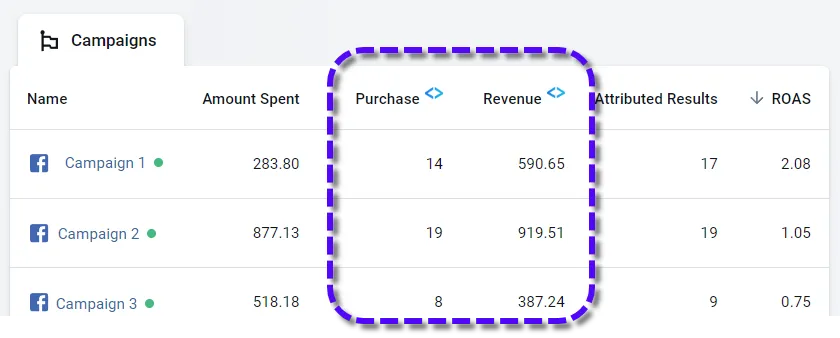
The ROAS column combines both: actual revenue from your conversion sources divided by actual ad spend from the ad platform.
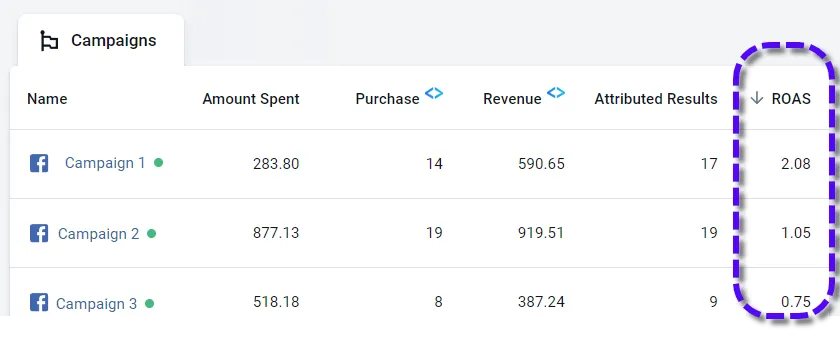
Use ROAS to identify campaigns not covering their own cost (ROAS below 1.0) and pause them directly from the report.
Attributed vs. Actual Conversions
Section titled “Attributed vs. Actual Conversions”The Campaign Report shows two types of conversion data side by side:
| Column | What It Shows | Source |
|---|---|---|
| Attributed Results | Conversions the ad platform attributes to the campaign based on its own model | Meta Ads, Google Ads, TikTok Ads |
| Purchase (AnyTrack) | Conversions AnyTrack tracked and matched to a campaign via UTM parameters | Your conversion source integrations |
These numbers typically differ. Ad platforms apply their own attribution windows, post-view attribution, and conversion modeling (especially after iOS 14). AnyTrack reports based on server-side data matched to the last click.
Key Features
Section titled “Key Features”Add and Customize Columns
Section titled “Add and Customize Columns”Add metrics from four groups: Conversion Rates, Tracking Events, Costs, and Performance. View all available metrics in Advanced Options.
View Campaign Conversions
Section titled “View Campaign Conversions”Select a campaign, click the pencil icon, and choose View Conversions to see all conversion events for that campaign, ad set, or ad. Filter further by event type or integration.
Campaign Drill Down
Section titled “Campaign Drill Down”Click on any campaign to drill down into its ad sets and individual ads, with a full metric breakdown at each level.
Pause and Resume Campaigns
Section titled “Pause and Resume Campaigns”Select a campaign and click Pause or Resume to control it directly from the report.
Report Templates
Section titled “Report Templates”Choose from pre-built column templates for eCommerce, lead generation, or affiliate marketing . or fully customize the columns for your specific needs.
Export the Report
Section titled “Export the Report”Export your campaign data directly from the Campaign Report view. Select the campaigns or ad sets you want and export them to a single file for sharing or deeper analysis in a spreadsheet.
Traffic Sources
Section titled “Traffic Sources”| Source | Meaning |
|---|---|
| social / facebook | Organic traffic from Facebook (post links, Messenger, shared links . no ad click) |
| Organic traffic from Google (no ad click) | |
| google / cpc | Google paid click. The gclid parameter was detected but no campaign ID was found. Ensure the Google Ads UTM template is installed. |
Platform Limitations
Section titled “Platform Limitations”Campaign metrics (Amount Spent, Attributed Results, Attributed Revenue) are available for Meta Ads, Google Ads, and TikTok Ads only. For Microsoft Ads, Taboola, and Outbrain, check these metrics in their respective dashboards. This does not affect the conversion data AnyTrack sends to them server-side.
Frequently Asked Questions
FAQ was last reviewed on 2026-06-30