
Campaign Report Options
Advanced options, configuration, and troubleshooting for the Campaign Report in AnyTrack. Configure metrics, columns, and column groups for reporting.
This page covers the available metrics, column options, and platform-specific limitations for the Campaign Report. Use these options to customize your report view and understand how each metric is calculated.
Campaign Metrics Availability by Ad Platform
Section titled “Campaign Metrics Availability by Ad Platform”The Campaign Report does not sync the same metrics from every ad platform.
| Metric | Synced from |
|---|---|
| Amount Spent, Impressions, Clicks | Meta Ads, Google Ads, TikTok Ads, ChatGPT Ads, Microsoft Ads |
| Attributed Results, Attributed Revenue | Meta Ads, Google Ads, TikTok Ads, ChatGPT Ads, Microsoft Ads |
AnyTrack does not sync campaign metrics for Taboola or Outbrain. Read those metrics in the platform’s own reports.
Attributed Results and Attributed Revenue are the ad platform’s own attributed figures. AnyTrack still reports the conversions it tracked for every platform, and this does not affect the conversion data AnyTrack sends server-side. To inspect individual conversion events, use the Conversions Report.
Report Settings
Section titled “Report Settings”The Settings menu in the Campaign Report includes the Display active campaigns only option. This option filters on the status of the campaign.
- In the Campaigns view, the option removes the paused campaigns from the table.
- In the Ad Sets view and the Ads view, the option does not remove the paused ad sets or the paused ads. An active campaign shows every ad set and every ad that belongs to that campaign, active and paused.
Available Metrics
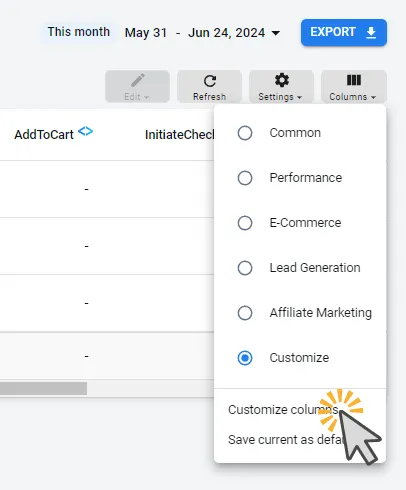
Section titled “Available Metrics”The following metrics can be added to the Campaign Report using the Customize Columns option.
Conversion Rates
Section titled “Conversion Rates”| Metric | Definition | Formula |
|---|---|---|
| Outbound Click Rate | The percentage of visitors who click an external link compared to total pageviews. | (Number of Outbound Clicks / Number of Pageviews) × 100 |
| Form Submit Rate | The percentage of visitors who submit a form compared to the total number of pageviews. | (Number of Form Submissions / Number of Pageviews or Sessions) × 100 |
| View Content Rate | The percentage of users who view specific content out of the total number of users who interacted with an ad or site. | (Number of Content Views / Total Interactions) × 100 |
| Add to Cart Rate | The percentage of users who add items to their cart out of the total number of users who interacted with an ad or site. | (Number of Add to Carts / Total Interactions) × 100 |
| Initiate Checkout Rate | The percentage of users who initiate the checkout process out of the total number of users who interacted with an ad or site. | (Number of Initiated Checkouts / Total Interactions) × 100 |
| Lead Rate | The percentage of users who become leads out of the total number of users who interacted with an ad or site. | (Number of Leads / Total Interactions) × 100 |
| Complete Registration Rate | The percentage of users who complete a registration process out of the total number of users who interacted with an ad or site. | (Number of Completed Registrations / Total Interactions) × 100 |
| Purchase Rate | The percentage of users who make a purchase out of the total number of users who interacted with an ad or site. | (Number of Purchases / Total Interactions) × 100 |
| Add Payment Info Rate | The percentage of users who add payment information out of the total number of users who interacted with an ad or site. | (Number of Add Payment Info Actions / Total Interactions) × 100 |
Tracking Events
Section titled “Tracking Events”| Metric | Definition | Source |
|---|---|---|
| Page View | The number of times a page on your website is viewed. | AnyTrack Tracking Tag |
| Outbound Click | The number of clicks that lead users away from your site to another domain. | AnyTrack Tracking Tag |
| Form Submit | The number of times a user submits a form on your site. | AnyTrack Tracking Tag |
| View Content | The number of times specific content on your site is viewed. | AnyTrack Tracking Tag |
| Add to Cart | The number of times users add items to their shopping cart on your site. | AnyTrack Integrations |
| Initiate Checkout | The number of times users start the checkout process on your site. | AnyTrack Integrations |
| Lead | The number of users who express interest in your product or service by providing contact information. | AnyTrack Integrations |
| Complete Registration | The number of users who complete a registration process on your site. | AnyTrack Integrations |
| Purchase | The number of completed transactions or sales on your site. | AnyTrack Integrations |
| Add Payment Info | The number of times users add payment information during the checkout process on your site. | AnyTrack Integrations |
The tables show the most common events. Customize Columns lists each event in each group. The list also includes Upsell and the custom events that your property recorded in the last 14 days. If the property recorded a Combined Order in the last 14 days, the list includes the CombinedOrder event and the Cost per CombinedOrder column. The Campaign Report has no AOV column.
| Metric | Definition | Formula |
|---|---|---|
| Cost per PageView | The average cost incurred for each page view generated from an ad campaign. | Total Ad Spend / Number of PageViews |
| Cost per Outbound Click | The average cost incurred for each outbound click (clicks that lead users away from the platform to your site). | Total Ad Spend / Number of Outbound Clicks |
| Cost per FormSubmit | The average cost incurred for each form submission. | Total Ad Spend / Number of Form Submissions |
| Cost per ViewContent | The average cost incurred for each content view. | Total Ad Spend / Number of Content Views |
| Cost per AddToCart | The average cost incurred for each “add to cart” action. | Total Ad Spend / Number of Add to Carts |
| Cost per InitiateCheckout | The average cost incurred for each initiated checkout process. | Total Ad Spend / Number of Initiated Checkouts |
| Cost per Lead | The average cost incurred for acquiring a lead. | Total Ad Spend / Number of Leads |
| Cost per Complete Registration | The average cost incurred for each completed registration. | Total Ad Spend / Number of Completed Registrations |
| Cost per Purchase | The average cost incurred for each purchase made. | Total Ad Spend / Number of Purchases |
| Cost per AddPaymentInfo | The average cost incurred for each instance of payment information being added. | Total Ad Spend / Number of Add Payment Info Actions |
Performance
Section titled “Performance”| Metric | Definition | Formula | Source |
|---|---|---|---|
| Sessions | The total number of sessions initiated by all users to your site within a given period. | AnyTrack Tracking Tag | |
| New Visitors | The number of unique visitors who visit your site for the first time. | AnyTrack Tracking Tag | |
| Revenue | The total income generated from sales. | AnyTrack Integrations | |
| Amount Spent | The total amount of money spent on an ad campaign. | Ad Platform | |
| Reach | The total number of unique users who have seen your ad. | Ad Platform | |
| Impressions | The total number of times your ad is displayed, regardless of whether it is clicked. | Ad Platform | |
| Link Clicks | The number of times users clicked on the link in your ad. | Ad Platform | |
| Interactions | The total number of engagements (likes, shares, comments) with your ad. | Ad Platform | |
| Engagements | The total number of actions users take involving your ad or page (likes, comments, shares). | Ad Platform | |
| Attributed Results | The results (e.g., conversions, sales) that are directly attributed to your ad campaign. | Ad Platform | |
| Attributed Revenue | The total revenue that can be directly attributed to your ad campaign. | Ad Platform | |
| Other Results | Any additional outcomes from your ad campaign not covered by the primary metrics. | ||
| All Results | The complete summary of all outcomes and metrics related to your ad campaign. | ||
| CPP (Cost per Purchase) | The average cost incurred for each purchase made. Equivalent to Cost per Purchase. | Calculated | |
| CPM (Cost per Mille) | The cost incurred per 1,000 impressions of your ad. | Total Ad Spend / Number of Impressions × 1000 | Calculated |
| CPC (Cost per Click) | The average cost incurred for each click on your ad. | Total Ad Spend / Number of Clicks | Calculated |
| CTR (Click-Through Rate) | The percentage of ad impressions that result in clicks. | Number of Clicks / Number of Impressions × 100 | Calculated |
| Frequency | The average number of times each unique user sees your ad. | Total Impressions / Unique Reach | Calculated |
| ROAS (Return on Ad Spend) | The revenue generated for every dollar spent on advertising. Calculated from actual revenue and ad spend. | Revenue from Ad Campaign / Cost of Ad Campaign | Revenue from AnyTrack Integrations. Cost from Ad Platform. |
Frequently Asked Questions
FAQ was last reviewed on 2026-10-22