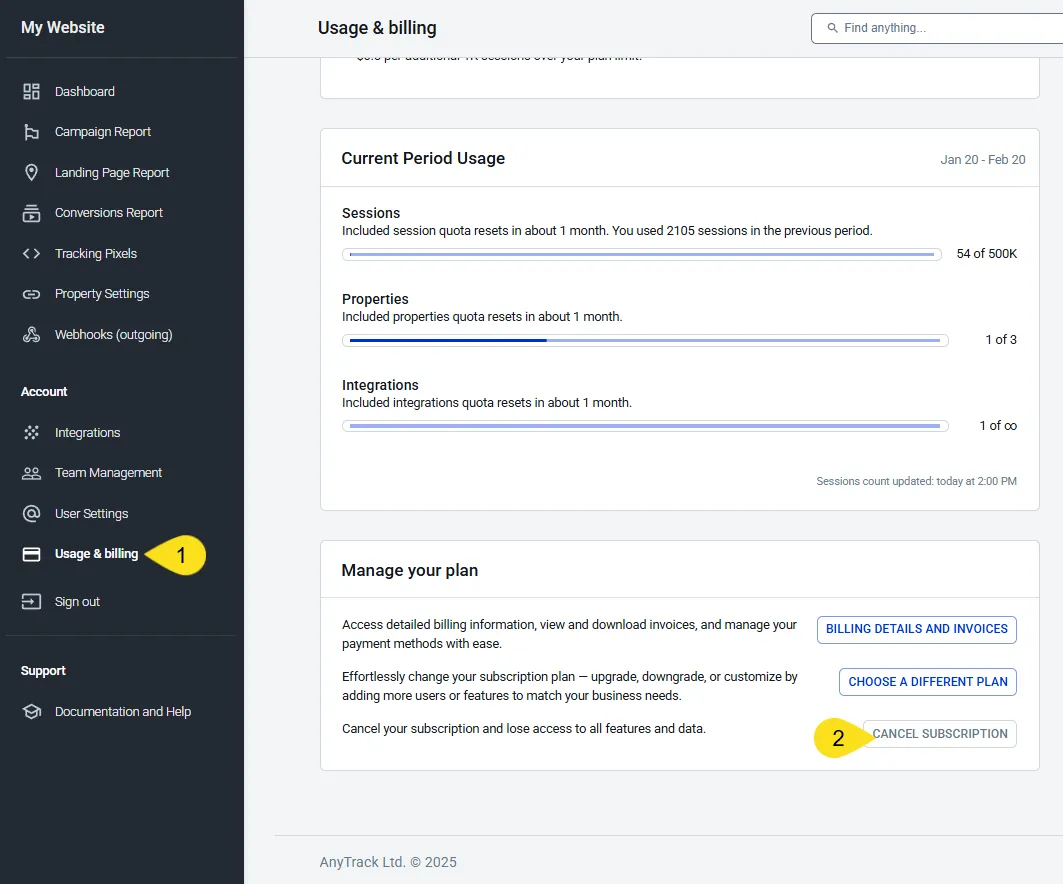
Cancel your AnyTrack subscription anytime. Open Usage & billing, find Manage your plan, and click Cancel Subscription. Service continues through your current billing period.
To cancel your AnyTrack subscription, open Usage & billing from the account menu, scroll to Manage your plan, and click Cancel Subscription. If tracking isn’t working as expected, contact Support first. Our team can guide you through setup to achieve your expected results.
The Cancel AnyTrack subscription option is available in the Usage & billing section.
Your service continues through the end of your current billing period. You won’t be charged for the next cycle.
Your Tracking Tag remains active during this period and continues to collect conversion data.
At the end of the billing period, AnyTrack suspends your account and tracking stops.
A suspended account keeps access to Usage & billing only, so you can reactivate. Your reports, properties, and settings stay unavailable until you reactivate.
Historical conversion data is retained in your account for 12 months. Reactivate your subscription anytime during this period to resume access.
12 months after cancellation, AnyTrack permanently deletes your historical conversion data. To keep your history, reactivate before the 12 months end.
To reactivate your subscription, navigate back to Usage & billing and upgrade to a paid plan. The 14-day free trial applies once per account — if your account already used its trial, reactivating starts your paid plan and billing immediately, with no new trial.
Reactivation turns your account back on, but it does not always restore the connections your conversion sources rely on. While an account is suspended, its integrations are disabled, so their webhooks return errors to the source platform. Shopify deletes a webhook that keeps failing, so a Shopify store always needs its webhooks added again. WooCommerce, GoHighLevel, ClickFunnels, Systeme.io, and Funnelish keep theirs. Check your webhooks anyway: a platform can change this policy at any time.
Open each integration in the Integration Catalog and confirm that its status is connected.
Open the integration’s Events Log tab and confirm that events arrive.
Open the source platform and confirm that the AnyTrack webhooks still exist. Add any that are missing. On Shopify, expect to add them again.
Cancellation FAQ
FAQ was last reviewed on 2026-10-24
Can I pause my subscription?
No. AnyTrack has no pause option. To stop future charges, cancel your subscription. Your service continues through the end of your current billing period. At the end of the billing period, AnyTrack suspends your account and tracking stops. Your historical conversion data stays in the account for 12 months, then AnyTrack deletes it permanently. To come back, reactivate on a paid plan from Usage & billing. If your account already used its free trial, reactivating starts your paid plan and billing immediately, with no new trial.
Does cancelling put my account back on the Free plan?
No. When your billing period ends, AnyTrack suspends the account and tracking stops. The account is not downgraded to Free. The Free plan is available only to accounts that have never started a free trial or a paid plan. See Free Plan.
What happens to my tracking after I cancel?
Your Tracking Tag keeps collecting data until the end of the current billing period. After that, the account is suspended and tracking stops. Your historical conversion data stays in the account for 12 months, then AnyTrack deletes it permanently.
What happens to my data if I do not come back within 12 months?
AnyTrack permanently deletes your historical conversion data 12 months after cancellation. The 12 months are a hard deadline, not a guideline: the deletion is final, and AnyTrack cannot restore the data afterwards. Reactivate before the deadline to keep your history, or export your reports before your billing period ends, while the reports are still available to you.
What can I still access while my account is suspended?
Usage & billing only, so you can reactivate your subscription. Your reports, properties, and settings stay unavailable until you reactivate. Your historical conversion data stays in the account for 12 months and returns when you reactivate. After 12 months, AnyTrack deletes it permanently.
Does tracking start again by itself when I reactivate?
Not always. Reactivation turns the account back on, but a suspended account has its integrations disabled, so their webhooks return errors to the source platform. Shopify deletes the AnyTrack webhooks from your store settings, and reactivating does not bring them back. WooCommerce, GoHighLevel, ClickFunnels, Systeme.io, and Funnelish keep theirs, but check them anyway: a platform can change this policy at any time. After you reactivate, check the Conversions Report for new events, confirm each integration is connected, and add any missing webhooks again from that integration's setup steps.
Can I get a refund when I cancel?
No. Cancelling stops future charges but does not refund the current period. The main exception is a trial that was charged without the account being used. See the Refund Policy.
Do I get a new 14-day trial when I come back?
No. The free trial applies once per account. If your account already used its trial, reactivating starts your paid plan and billing immediately. Reactivate within 12 months to restore access to your historical data. After 12 months, that data is permanently deleted and cannot be restored.