
Webhooks (Outgoing)
Learn how to set up outgoing webhooks in AnyTrack to send conversion data to external platforms. Configure the webhook URL, the events to send, and the payload version for real-time data synchronization.
Outgoing webhooks let you send conversion events from AnyTrack to any external endpoint in real time. Common use cases include:
- Enrich your CRM with attribution data — Send every conversion event to HubSpot, Salesforce, or any CRM so your sales team sees which ad, campaign, and keyword drove each lead.
- Build internal reports from conversion data . Send events to a data warehouse, Google Sheets, or a BI tool to create custom dashboards outside of AnyTrack.
- Trigger Slack notifications for specific conversions . Route events through Zapier or Make to send a Slack message when a customer signs up with specific UTM keywords or campaign tags.
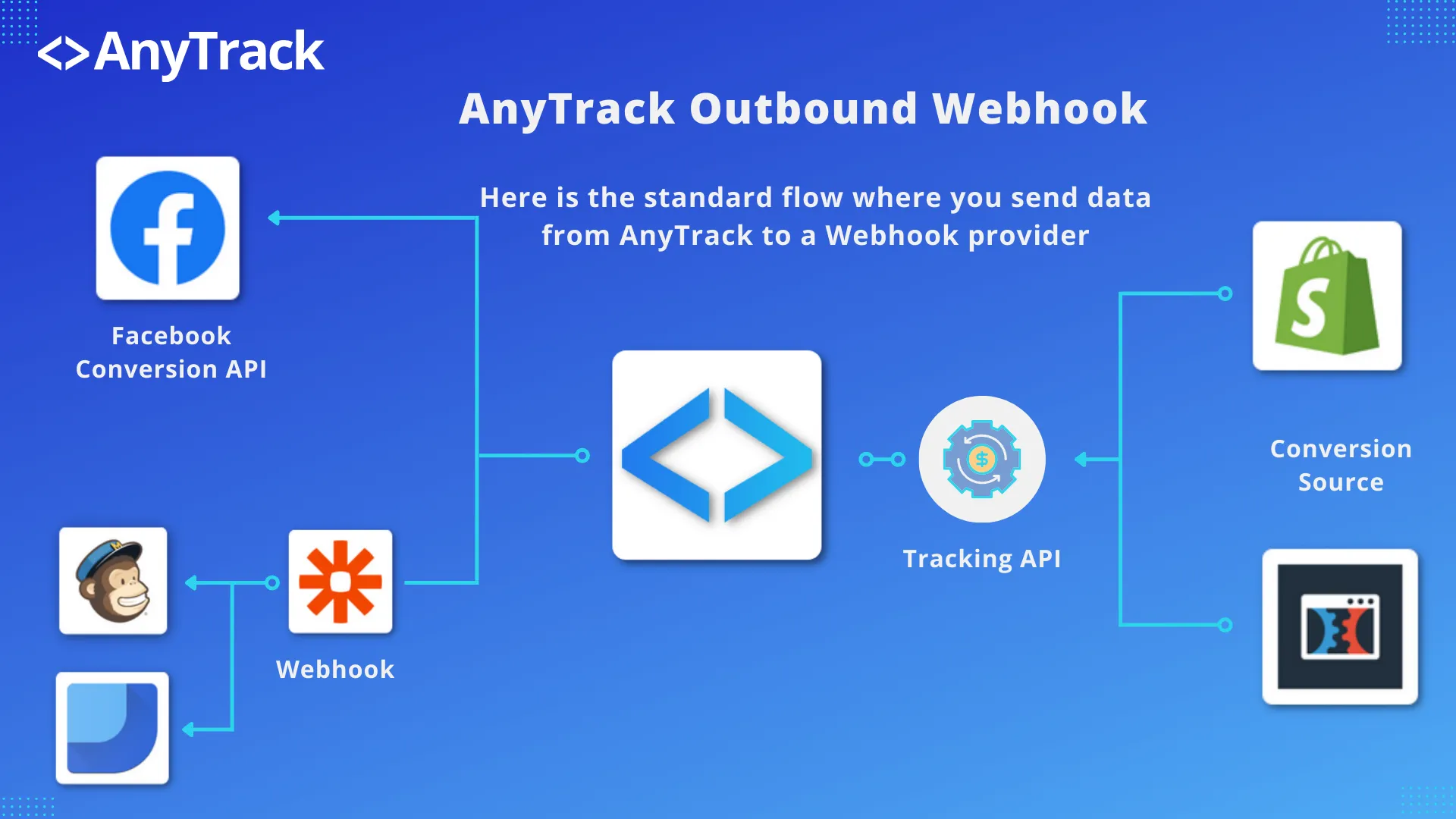
The Webhooks (Outgoing) feature is available on Personal and Advance plans. See Pricing for details.
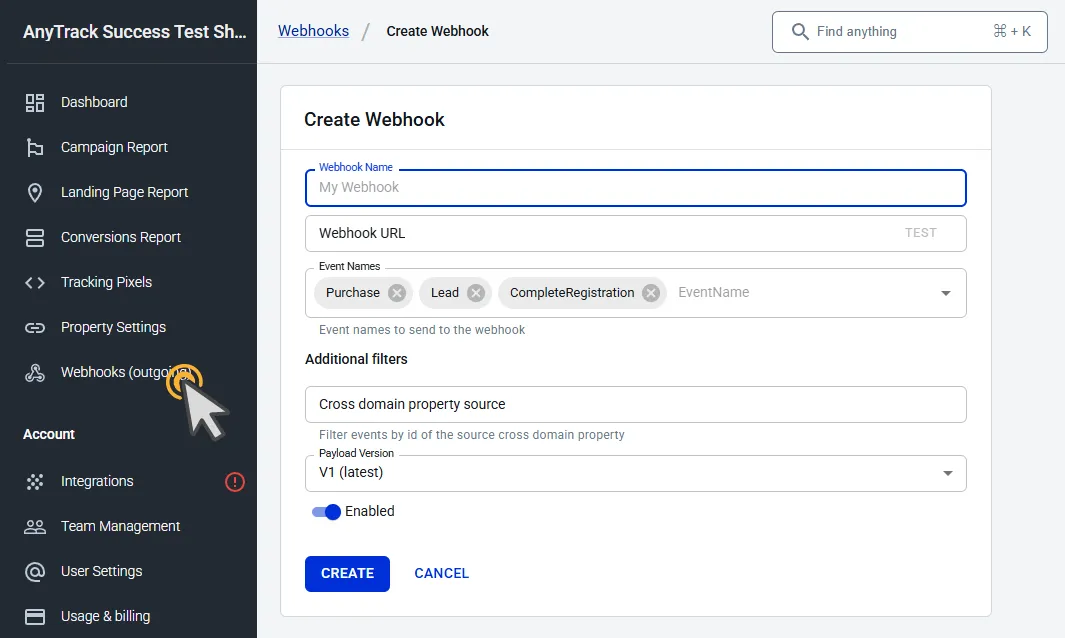
Setup Guide
Section titled “Setup Guide”- Click Webhooks (outgoing) in the left sidebar.
- Click New Webhook
- Enter the destination URL provided by the receiving platform
- Select the events you want to send
- Click Create
Conversions send in real time as soon as they appear in the Conversions Report. Each event includes full attribution data, including the traffic source, event attributes, and custom parameters.
Testing Your Webhook
Section titled “Testing Your Webhook”To send sample data to your endpoint, open the webhook form and click Test next to the Webhook URL field. The test request uses sample values (for example, example.com pages and the click ID CLICK_ID) in the same structure as a real event.
Use a platform like webhook.site to verify that your outgoing webhooks are working before connecting a production endpoint. Create a temporary URL on webhook.site, paste it as the destination in AnyTrack, trigger a test conversion, and confirm the payload arrives.
Troubleshooting
Section titled “Troubleshooting”If your webhook endpoint returns more than 10 consecutive errors, AnyTrack automatically disables it and sends you a notification. To resolve this:
- Verify that your endpoint URL is reachable and returns a 200 status code
- Check for authentication or firewall rules blocking incoming requests
- Re-enable the webhook from the dashboard once the endpoint is fixed
Webhook Payload Reference
Section titled “Webhook Payload Reference”AnyTrack sends each event as an HTTP POST request with one JSON object in the body. The request has two headers:
Content-Type: application/jsonUser-Agent: AnyTrack-Webhooks/1.0(AnyTrack-Webhooks/0.3for Payload Version V0)
AnyTrack does not sign webhook requests, so there is no signature to verify.
Each webhook event includes the conversion details (event name, value, currency), full attribution data (source, medium, campaign), click IDs, UTM parameters, and custom parameters. Fields with no value are left out. When the event has them, the payload also includes referrer, transactionTax, transactionShipping, items, and traits.
Below is an example payload for Payload Version V1 (latest), the default in the webhook form.
{ "assetId": "IBTO9lOfAMyb", "clientId": "WS1Rxx07V9MG2I", "externalClientIds": { "googleAnalytics4": "1758379098.1741266432" }, "clickId": "IBTO9lOfAMybWS1Rxx07V9MG2IvXUIPO0J", "externalClickId": "Sn40FJ3pUJn843YIfr1cSBG1WovXU4OjFX", "eventName": "Purchase", "eventTime": "2025-03-06T13:38:57.616Z", "eventTimestamp": 1741268337, "eventValue": 37.99, "currency": "EUR", "userAgent": "Mozilla/5.0 (Macintosh; Intel Mac OS X 10_15_7) AppleWebKit/537.36 (KHTML, like Gecko) Chrome/133.0.0.0 Safari/537.36", "location": "https://unbounce.anytrack.io/?utm_source=facebook&utm_medium=cpc&utm_content=unbounce+adset&utm_campaign=unbounce+campaign&utm_term=unbounce+ads&utm_id=123123123123&ad_id=12312312vv3123&adset_id=123123123xx123&placement=feed&site_source_name=facebook.com&fbclid=Sn40FJ3pUJn843YIfr1cSBG1WovXU4OjFX", "brandName": "TRY FREE_cj", "linkId": "lp-pom-button-194", "linkURL": "https://unbounce.anytrack.io/clkn/https/www.tkqlhce.com/click-8971597-14073404", "linklabel": "TRY FREE", "trackingGroupId": "custom", "integrationId": "custom-integromat", "transactionId": "ebf390c5-6677-4b6f-9d44-ea21b1791a49", "customParams": { "clickid": "IBTO9lOfAMybWS1Rxx07V9MG2IvXUIPO0J", "brand_name": "TRY FREE_cj", "transactionId": "ebf390c5-6677-4b6f-9d44-ea21b1791a49", "eventName": "Purchase", "eventValue": "35.1741268337", "currency": "EUR", "useOriginalTime": "1706799662124", "eventTime": "1741268332" }, "mainAttribution": { "eventIndex": "BLdt3TDh7X2", "time": "2025-03-06T13:07:11.625Z", "identifier": "fbclid", "page": "unbounce.anytrack.io/", "location": "https://unbounce.anytrack.io/?utm_source=facebook&utm_medium=cpc&utm_content=unbounce+adset&utm_campaign=unbounce+campaign&utm_term=unbounce+ads&utm_id=123123123123&ad_id=12312312vv3123&adset_id=123123123xx123&placement=feed&site_source_name=facebook.com&fbclid=Sn40FJ3pUJn843YIfr1cSBG1WovXU4OjFX", "referrer": "https://samcartlp.anytrack.app/", "source": "facebook", "medium": "cpc", "campaign": "123123123123", "term": "unbounce ads", "content": "unbounce adset", "creative": "12312312vv3123", "params": { "utm_id": "123123123123", "adset_id": "123123123xx123", "ad_id": "12312312vv3123", "placement": "feed", "site_source_name": "facebook.com" }, "fbclid": "Sn40FJ3pUJn843YIfr1cSBG1WovXU4OjFX" }, "attributions": [ { "eventIndex": "BLdt3TDh7X2", "time": "2025-03-06T13:07:11.625Z", "identifier": "fbclid", "page": "unbounce.anytrack.io/", "location": "https://unbounce.anytrack.io/?utm_source=facebook&utm_medium=cpc&utm_content=unbounce+adset&utm_campaign=unbounce+campaign&utm_term=unbounce+ads&utm_id=123123123123&ad_id=12312312vv3123&adset_id=123123123xx123&placement=feed&site_source_name=facebook.com&fbclid=Sn40FJ3pUJn843YIfr1cSBG1WovXU4OjFX", "referrer": "https://samcartlp.anytrack.app/", "source": "facebook", "medium": "cpc", "campaign": "123123123123", "term": "unbounce ads", "content": "unbounce adset", "creative": "12312312vv3123", "params": { "utm_id": "123123123123", "adset_id": "123123123xx123", "ad_id": "12312312vv3123", "placement": "feed", "site_source_name": "facebook.com" }, "fbclid": "Sn40FJ3pUJn843YIfr1cSBG1WovXU4OjFX" } ], "ip": "77.127.186.155"}FAQ and Troubleshooting
FAQ was last reviewed on 2026-10-24