
Golden Nugget
Get the most out of your digital marketing stack with the AnyTrack Golden Nugget integration. Easily track and attribute conversions across your affiliate networks with our simple setup.
What is the Golden Nugget Integration?
Section titled “What is the Golden Nugget Integration?”The Golden Nugget integration connects your affiliate marketing campaigns with AnyTrack’s conversion tracking system. This integration automatically collects visitor data, tracks affiliate link clicks, and records conversions from Golden Nugget offers.
Why Use This Integration?
Section titled “Why Use This Integration?”Track Every Conversion Get complete visibility into your affiliate performance with conversion data that AnyTrack pulls from Golden Nugget once a day.
Optimize Ad Campaigns Feed accurate conversion data to Google Ads, Facebook Ads, and TikTok Ads for automatic campaign optimization.
Maximize ROI Make data-driven decisions with detailed attribution reports showing which traffic sources generate the most valuable conversions.
How the Integration Works
Section titled “How the Integration Works”The 4-Step Process
Section titled “The 4-Step Process”-
Visitor Arrives: AnyTrack collects traffic source data and visitor information when someone lands on your website.
-
Link Click Tracked: When visitors click your Golden Nugget affiliate links, AnyTrack:
- Records detailed click data
- Sends events to your Tracking Tags
- Adds a unique identifier (
click_id) to the link
-
Conversion Recorded: When visitors convert on Golden Nugget, AnyTrack gets the conversion data from Golden Nugget through API Integration. AnyTrack pulls this data once a day.
-
Data Distributed: AnyTrack processes the conversion and sends it to your ad platforms (Google Ads, Facebook Ads, TikTok Ads) for campaign optimization.
Integration Details
Section titled “Integration Details”| Setting | Value | Purpose |
|---|---|---|
| Tracking Group | incomeaccess | Activates automatic link tagging for Golden Nugget links |
| Subid Parameter | c or aid | AutoTag adds the click ID in c on links with /C.ashx, and in aid on links with /wl/clk/ |
| Method | API Integration | AnyTrack pulls conversion data from Golden Nugget once a day |
Tracked Events
Section titled “Tracked Events”| Event | When It Triggers | Data Source |
|---|---|---|
| OutboundClick | Visitor clicks a Golden Nugget offer link | AnyTrack tracking tag |
| Lead | Free registration completed on Golden Nugget | Direct API from Golden Nugget |
| CompleteRegistration | First deposit recorded on Golden Nugget | Direct API from Golden Nugget |
| Purchase | Commission generated from user activity | Direct API from Golden Nugget |
Setup Instructions
Section titled “Setup Instructions”Step 1: Install the Integration
Section titled “Step 1: Install the Integration”- Go to your AnyTrack Integration Catalog
- Search for “Golden Nugget”
- Click the Golden Nugget card
- Click Install
Step 2: Generate Security Key
Section titled “Step 2: Generate Security Key”To connect your Golden Nugget account to AnyTrack:
- Log into your Golden Nugget affiliate dashboard
- Navigate to Settings > API or Security Keys
- Click Generate New Key
- Set IP whitelist to
0.0.0.0/0(allows AnyTrack’s servers to receive conversions) - Copy the security key
Step 3: Add Security Key to AnyTrack
Section titled “Step 3: Add Security Key to AnyTrack”- Return to AnyTrack integration settings
- Paste your security key in the designated field
- Click Save
Validate Your Setup
Section titled “Validate Your Setup”Check Link Tracking
Section titled “Check Link Tracking”Your affiliate links need proper tracking data tags. AnyTrack handles this automatically through AutoTag.
AutoTag Methods:
- Automatic (Recommended): AnyTrack finds and tags Golden Nugget links automatically
- AutoScan: Works with redirect plugins by scanning and tagging embedded links
- Manual: Add tracking attributes using
data-tracking-group="incomeaccess"or append&c=--CLICK-ID--to/C.ashxlinks and&aid=--CLICK-ID--to/wl/clk/links
Manual Link Example:
<a href="https://example.foo/goto/goldennugget" data-tracking-group="incomeaccess"> Golden Nugget Offer</a>Verify Link Tagging:
- Add a Golden Nugget affiliate link to your website
- Hover over the link or inspect it in browser developer tools
- Confirm the
c=[click_id]parameter is added automatically
Verify Conversions
Section titled “Verify Conversions”Check your conversion tracking by either:
- Waiting for a natural conversion
- Creating a test conversion yourself
Then inspect the conversion logs in your AnyTrack dashboard to confirm data flows correctly.
Sample Conversion Data:
{ "netrevenue": "2.55", "affcustomid": "QfdSVGM3YZTZjwj0DElkDFYFBbgendJlTZ", "activedays": "1", "totalcommission": "1.02", "bannerid": "1195", "creativename": "Text_Link_WH_Sport", "clicks": "0"}What to Expect After Setup
Section titled “What to Expect After Setup”Timeline
Section titled “Timeline”Tracking Timeline:
- Immediate: Link clicks appear as OutboundClick events in AnyTrack (visible within seconds)
- Daily conversions: AnyTrack pulls conversion data from the affiliate program once a day, then sends it to your connected ad platforms
- Validation timeframe: Depending on your traffic volume, you can validate link tracking within minutes to hours. Conversions appear after the next daily pull
Where to Check
Section titled “Where to Check”- Link tracking: Use the AnyTrack Pixel Helper extension on your website
- Conversions: Check the Events Log in your AnyTrack dashboard
- Attribution: View Attribution Reports in your dashboard
- Real-time validation: Connect Google Analytics 4 and use Debug View to see click events in real-time
If You Don’t See Data
Section titled “If You Don’t See Data”If conversions don’t appear after the next daily pull:
- Review the Events Log for errors
- Verify the
coraidparameter appears in your Golden Nugget dashboard reports - Follow troubleshooting steps below
Common Questions
Section titled “Common Questions”Common Questions
FAQ was last reviewed on 2026-10-26
Can I import past conversions?
click_id to connect them to traffic sources.Can I track direct linking campaigns?
Can I use a different <code>subid</code> parameter?
c on links with /C.ashx, and in aid on links with /wl/clk/. A different parameter prevents AnyTrack from tracking the conversion back to the original click.What if conversions don't have a <code>click_id</code>?
click_id cannot be tracked. The click_id connects the conversion back to the original website visit and traffic source. Without it, AnyTrack cannot attribute the conversion correctly. Learn more about click IDsTroubleshooting
Section titled “Troubleshooting”Step 1: Verify Your Basic Setup
Section titled “Step 1: Verify Your Basic Setup”Check Tracking Tag Installation
- Install the AnyTrack Pixel Helper Chrome Extension
- Visit your website
- Verify the extension icon turns blue (indicating AnyTrack Tag is detected)
- If the icon doesn’t turn blue, review tag installation
Verify Security Key is Valid
- Go to your AnyTrack integration settings for Golden Nugget
- Check for error messages in the integration status
- If you see “Api key format is invalid” or similar errors:
- Log into your Golden Nugget affiliate dashboard
- Generate a new security key
- Update the security key in AnyTrack settings
- Click Save
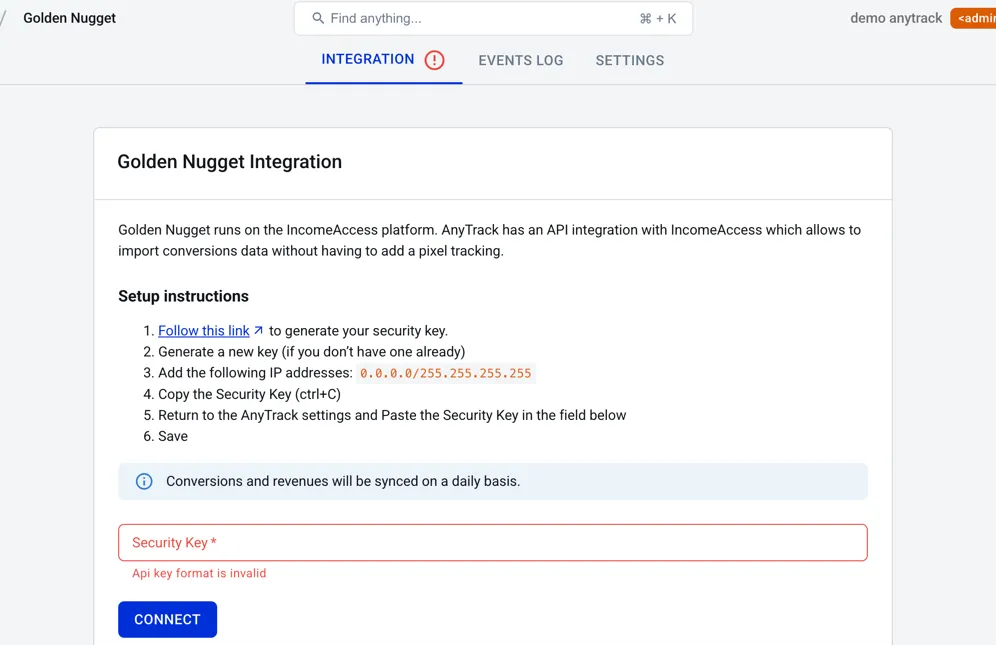
Step 2: Not Getting Any Conversions?
Section titled “Step 2: Not Getting Any Conversions?”Check Your Integration Settings
- Verify the integration is active in your Golden Nugget affiliate dashboard
- Confirm you’re using the correct AutoTag parameter (
con/C.ashxlinks,aidon/wl/clk/links) - Check that your security key hasn’t expired (if applicable)
Check Your Link Tagging
- Verify links aren’t hidden behind JavaScript or double redirects
- Ensure links use standard
<a>HTML elements - Try adding the tracking group manually:
data-tracking-group="incomeaccess"
Step 3: Conversions Show Errors?
Section titled “Step 3: Conversions Show Errors?”Most Common Issue: Missing Click ID
This happens when AutoTag couldn’t add the click_id to your affiliate links.
Solutions:
- Check if links are behind JavaScript or complex redirects
- Verify links are in standard HTML format
- Manually add tracking group attributes to links
- Ensure your offers only get traffic from pages with the AnyTrack Tag installed
Conversions Not Validated?
- Compare your integration settings with AnyTrack’s pre-defined integration
- Copy the Event Reference from your Events Log and contact support
Related Resources
Section titled “Related Resources”Essential Setup Guides
Section titled “Essential Setup Guides”- Install AnyTrack Tag - Set up tracking on your website
- AutoTag Explained - Understand automatic link tagging
- Tracking Groups (TGID) - Learn about tracking group identifiers
- Click ID Overview - Understand unique click identifiers
IncomeAccess Platform
Section titled “IncomeAccess Platform”- IncomeAccess Integration Overview - Platform explanation and all available programs
- Request New Integration - Suggest a program
Monitoring & Troubleshooting
Section titled “Monitoring & Troubleshooting”- Events Log - Monitor conversion data
- AnyTrack Pixel Helper - Verify tracking installation
- Integration Troubleshooting - Common issues
- Contact Support - Get help from our team
Advanced Setups
Section titled “Advanced Setups”- Direct Linking Setup - Track direct-to-offer campaigns
- Cross-Domain Tracking - Track across multiple domains