
Facebook Incremental Attribution
Understand the Meta incremental attribution model and Conversion Lift studies, how they count only the conversions Meta received, how the AnyTrack Conversion API feed supports them, how to enable incremental attribution in Meta Ads Manager, and how Google Ads Conversion Lift compares.
Meta’s incremental attribution model estimates how many conversions your ads caused. Standard attribution credits every conversion inside the attribution window. Incremental attribution counts only the conversions that Meta predicts would not occur without the ad.
What Is Incremental Attribution?
Section titled “What Is Incremental Attribution?”Incremental attribution is a Meta attribution model. Meta uses machine learning models that predict whether an ad caused each conversion. The model reports only the conversions that Meta considers incremental. Standard attribution reports all conversions inside the attribution window.
Meta offers two incrementality tools. They answer the same question with different methods.
| Incremental attribution | Conversion Lift | |
|---|---|---|
| What it is | An attribution model that you select in Meta Ads Manager | A study with a randomized test group and control group |
| How Meta decides | Machine learning models predict whether an ad caused the conversion | Meta compares the conversions of the test group with the conversions of the control group |
| Where you see it | The ad set attribution model, or the Compare attribution models column | The lift study results |
| Attribution window | The campaign attribution setting applies | None. Every conversion by a group member during the study counts |
How It Differs from Standard Attribution
Section titled “How It Differs from Standard Attribution”Standard Meta attribution is rule-based. Meta credits an ad with every conversion inside the attribution setting, for example 7-day click and 1-day view. The conversion counts even when the person would have converted without the ad. Incremental attribution reports only the conversions that Meta predicts the ad caused.
Meta gives this example. A campaign has 100 conversions. Meta considers 70 of them incremental. The Results column shows 70 under incremental attribution and 100 under your standard attribution model. Derived metrics, such as cost per result, follow the same logic.
What AnyTrack Sends to Meta
Section titled “What AnyTrack Sends to Meta”AnyTrack does not measure incrementality. AnyTrack sends every conversion to Meta via the Conversion API. Before AnyTrack sends a conversion, AnyTrack deduplicates the conversion. AnyTrack also adds the first-party match keys: the fbc and fbp identifiers, and the hashed email, phone number, and external_id. See Facebook Conversion API for the full pipeline.
Meta’s incrementality measurement counts only the conversions that Meta received. Meta matches each conversion to a person in the test group or the control group on first-party data. If the match keys are weak, Meta cannot match the conversion. Unmatched conversions lower the reported lift.
This means:
- Send every conversion to Meta, not only the conversions after a Meta click. AnyTrack does this automatically.
- Send each conversion from one source. Duplicate senders inflate the count on both groups.
- Keep your Event Match Quality high. Real customer data in the correct format improves the match rate.
Conversion Lift Studies on Meta
Section titled “Conversion Lift Studies on Meta”A Conversion Lift study is a separate test. Meta randomizes the audience and assigns Accounts Center accounts to two groups. The test group sees your ads. The control group does not see your ads.
Meta counts the conversions from your Meta Pixel events, app events, offline event sets, and custom conversions. Meta matches conversions to the people in each group during the study. Meta continues to match conversions during the observation period after the study ends.
A lift study applies no attribution window. Every conversion by a group member during the study counts. The conversion counts after a click, after a view, or with no ad interaction. This rule is the difference between a lift study and an attribution setting such as 7-day click and 1-day view.
Enable Incremental Attribution
Section titled “Enable Incremental Attribution”- Open Meta Ads Manager and click Create.
- Select Sales, Engagement, or Leads as the campaign objective. Click Continue.
- Complete the campaign settings. Click Next.
- In the ad set, select Website or Website and app as the Conversion location.
- Below Conversion goals, select Maximize number of conversions or Maximize value of conversions. Click Show more options.
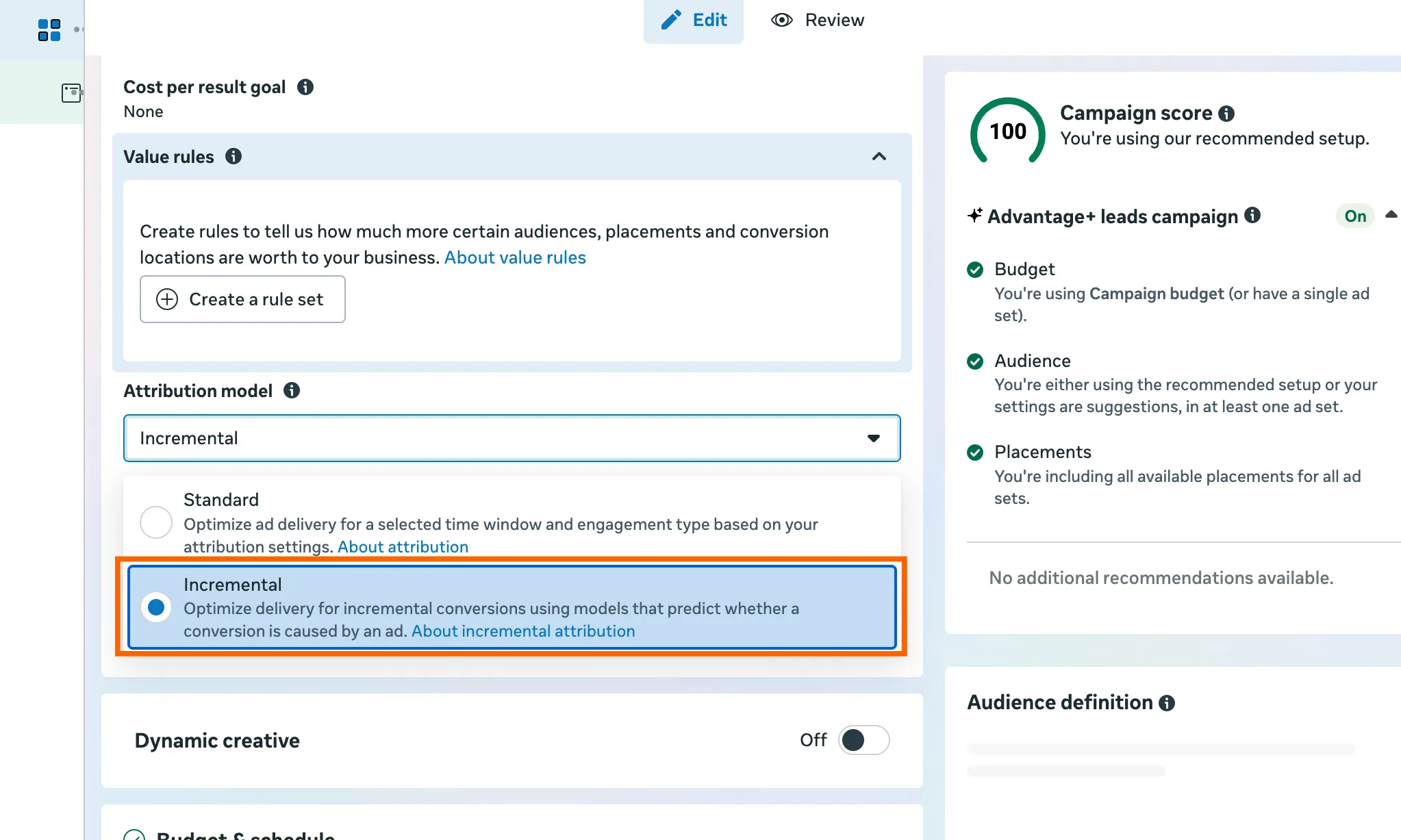
- Below Attribution model, open the Options dropdown menu and select Incremental.
- Complete the ad set and the ad. Click Publish.
View Incremental Results for Any Campaign
Section titled “View Incremental Results for Any Campaign”You can view modeled incremental results for a campaign that uses standard attribution.
- In Meta Ads Manager, click the Columns: Performance dropdown menu.
- Select Compare attribution models.
- Select Incremental and click Apply.
How This Compares on Google Ads
Section titled “How This Compares on Google Ads”Google Ads has no incremental attribution model in its reports. Google Ads measures incrementality with Conversion Lift studies. Conversion Lift is not available for all Google Ads accounts. To run a study, contact your Google account representative.
Google Ads offers two types of Conversion Lift study:
- Based on users. Google splits the audience into a test group and a holdback group of 1% to 50%. Your account must track at least one compatible conversion action. Every conversion action must trigger without conditions. Google does not support store visits, store sales, or offline conversion imports without customer data.
- Based on geography. Google splits geographic areas into test and control groups. The campaign must target a single country. Google accepts four conversion sources: the Google Ads Conversion Tag, the Firebase Conversion Tag, Display and Video 360 Floodlight, and offline conversions aggregated to ZIP or city level.
In both types, Google counts only the conversions that Google Ads received. AnyTrack sends conversions to Google Ads via the Conversion API with the customer data that Enhanced Conversions requires.
| Meta | Google Ads | |
|---|---|---|
| Modeled incremental attribution | Yes. The Incremental attribution model in Meta Ads Manager | No |
| Lift study | Conversion Lift. Meta randomizes Accounts Center accounts into test and control groups | Conversion Lift based on users, or based on geography |
| Access | Meta Ads Manager | Google account representative |
| Conversions counted | Meta Pixel events, app events, offline event sets, and custom conversions that Meta received | Compatible conversion actions that Google Ads received |
Playbook
-
 Taboola
 -
 Shopify
 -
 Facebook Ads
 -
 Google Ads
The Advertorial + Shopify Playbook
Native traffic to advertorial to checkout, stitched across domains. Taboola gets purchase postbacks; Meta and Google retarget real reader intent.
Related Resources
Section titled “Related Resources”- Facebook Ads Integration
- Facebook Conversion API
- Facebook Event Match Quality
- Google Ads Integration
- Conversion Attribution Matrix
Incremental Attribution FAQ
FAQ was last reviewed on 2026-10-26