
ChatGPT Ads UTM Parameters
Set up ChatGPT Ads UTM parameters with the OpenAI dynamic macros so AnyTrack attributes conversions and campaign metrics to the right campaign, ad group, and ad in the Campaign Report.
Why UTM Parameters Matter for ChatGPT Ads
Section titled “Why UTM Parameters Matter for ChatGPT Ads”The ChatGPT Ads integration sends your conversions to OpenAI and fetches your campaign metrics. The UTM parameters tell AnyTrack which campaign, ad group, and ad served each click. AnyTrack reads the parameters from the landing page URL and attributes each visit and conversion to the campaign. Without UTM parameters, the Campaign Report still identifies the traffic as ChatGPT Ads through the oppref click reference, but the traffic does not align with your campaigns, ad groups, and ads. Those fields show (not set).
About ChatGPT Ads
Section titled “About ChatGPT Ads”OpenAI serves ads inside ChatGPT and manages them through Ads Manager. Ads Manager is in beta, and OpenAI adds measurement features over time. Before you launch new campaigns, verify the current macro list against the OpenAI Measure Results guide.
ChatGPT Ads UTM Parameters Template
Section titled “ChatGPT Ads UTM Parameters Template”utm_source=chatgpt&utm_medium=cpc&utm_id={campaign_id}&ad_group_id={ad_group_id}&ad_id={ad_id}&utm_content={ad_group_id}&utm_campaign={campaign_id}Ads Manager fills each {curly brace} macro with a real value when the ad serves. The template carries the ad group and ad IDs as standalone parameters (ad_group_id, ad_id). The Reddit and Google Ads templates use the same pattern. Attribution reaches the individual ad without utm_term.
Add the Template in Ads Manager
Section titled “Add the Template in Ads Manager”- In Ads Manager, open the Campaigns page.
- Click the three-dot menu on the campaign and select Edit campaign.
- Enter the template in the Landing page query parameters field.
- Save your changes.
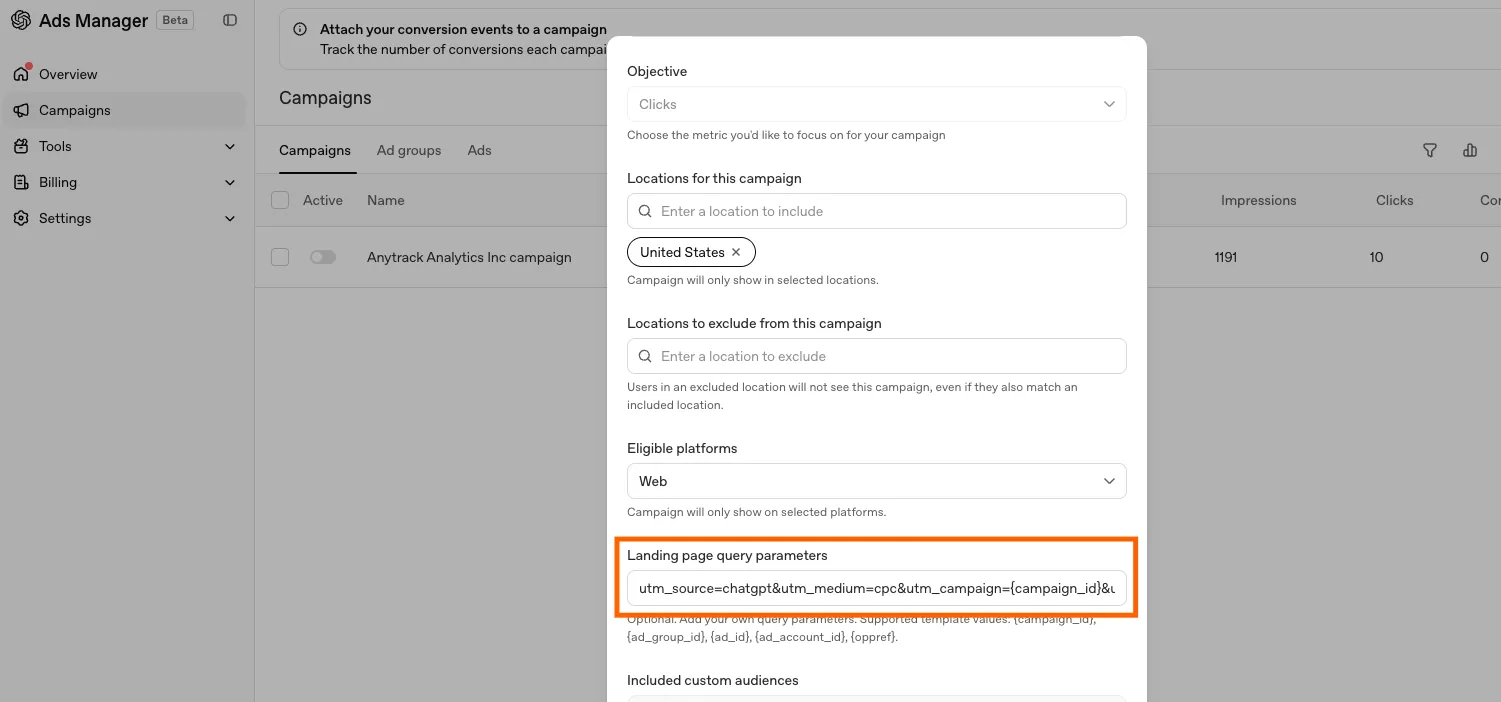
The same field exists for ad groups and ads. On the Ad Groups or Ads page, click the three-dot menu. Select Edit ad group or Edit ad.
UTM Parameter Breakdown
Section titled “UTM Parameter Breakdown”Each parameter serves a specific purpose in your attribution chain:
| Parameter | Value | What It Tells AnyTrack |
|---|---|---|
utm_source | chatgpt | The traffic source is ChatGPT Ads |
utm_medium | cpc | The visit came from a paid click |
utm_id | {campaign_id} | The campaign ID as a standard campaign identifier |
ad_group_id | {ad_group_id} | The ad group, passed as a standalone parameter for reporting |
ad_id | {ad_id} | The individual ad, passed as a standalone parameter for reporting |
utm_content | {ad_group_id} | The ad group that served the ad |
utm_campaign | {campaign_id} | The campaign that served the ad |
Supported Macros
Section titled “Supported Macros”The Landing page query parameters field lists five supported template values. Ads Manager fills each value when the ad serves.
| Macro | Returns |
|---|---|
{campaign_id} | The ID of the campaign |
{ad_group_id} | The ID of the ad group |
{ad_id} | The ID of the ad |
{ad_account_id} | The ID of the ad account |
{oppref} | OpenAI’s click reference (see About the oppref Parameter) |
The Macros Return IDs, Not Names
Section titled “The Macros Return IDs, Not Names”The ID macros return IDs. OpenAI does not offer template values for campaign, ad group, or ad names. You do not need them. When your ChatGPT Ads account is connected, AnyTrack fetches the campaign structure from the ChatGPT Ads API and resolves each ID to the actual campaign, ad group, and ad name. The Campaign Report shows those names, with spend and results on each row.
If the Campaign Report shows raw IDs, the account is not connected. Connect ChatGPT Ads in Tracking Pixels. Keep the dynamic macros in the template, and do not replace them with static labels.
How AnyTrack Uses These Parameters
Section titled “How AnyTrack Uses These Parameters”When a visitor arrives from a ChatGPT Ads click, AnyTrack reads the UTM parameters from the URL. AnyTrack stores them alongside the click_id. When that visitor converts, AnyTrack attributes the conversion with the full campaign context.
This data flows into:
- Your Campaign Report, next to the campaign metrics from ChatGPT Ads
- Event Attributes sent to your connected ad platforms
- Custom audiences built from rules based on UTM parameters and events
About the oppref Parameter
Section titled “About the oppref Parameter”OpenAI appends the parameter oppref to every landing page URL from a ChatGPT Ads click. oppref is the OpenAI click reference. gclid on Google Ads and fbclid on Meta Ads play the same role. The Landing page query parameters field lists {oppref} as a template value. Do not add the parameter: OpenAI appends oppref automatically. AnyTrack reads the value and stores the value with the visitor journey. AnyTrack sends the value with each conversion through the Conversion API. See The oppref Click Reference.
Common Mistakes
Section titled “Common Mistakes”Expecting names from the macros. The dynamic macros return IDs. AnyTrack resolves the IDs to the actual names through your connected ChatGPT Ads account. If ChatGPT Ads is not connected in Tracking Pixels, the Campaign Report shows the raw IDs. See The Macros Return IDs, Not Names.
Setting parameters at more than one level. The most specific level takes precedence: Ad URL, then Ad, then Ad Group, then Campaign. A parameter on one ad overrides the campaign template for that ad. Keep the template at the campaign level unless you have a specific reason to override.
Adding oppref to the template. OpenAI appends oppref automatically. Leave the parameter out of your template.
Treating beta behavior as permanent. OpenAI changes Ads Manager over time. If a parameter stops filling, verify the macro list against OpenAI’s Measure Results guide.
ChatGPT Ads UTM FAQ
FAQ was last reviewed on 2026-10-26
Does AnyTrack send conversions to ChatGPT Ads?
Why does my Campaign Report show IDs instead of campaign names?
At which level should I set the landing page query parameters?
Do I need to add oppref to my UTM template?
oppref to your landing page URLs automatically. AnyTrack reads the value and sends the value with each conversion through the Conversion API. You do not need to add the parameter to your Landing page query parameters.