
Click ID Usage
Learn how to generate, collect, and use the AnyTrack Click ID (atclid) for accurate conversion tracking and attribution modeling with custom integrations and webhooks.
Overview
Section titled “Overview”Custom platforms don’t automatically send attribution data. When conversions happen in your proprietary CRM, custom checkout system, or any platform outside AnyTrack’s 300+ integrations, attribution breaks—Facebook sees zero conversions from ads driving real sales, Google stops optimizing campaigns that actually work, and ROAS calculations become guesswork.
The AnyTrack Click ID (atclid) solves this. Collect it when visitors land on your site, attach it to customer records in your system, then include it when sending conversion webhooks to AnyTrack. That identifier connects the CRM sale back to the Facebook ad that started the journey — restoring attribution accuracy and feeding ad platforms the conversion signals they need.
What is the AnyTrack Click ID (atclid)?
Section titled “What is the AnyTrack Click ID (atclid)?”The atclid is a unique identifier generated by the AnyTrack Tracking Tag when a visitor clicks on your ads and lands on your website. This ID is essential for:
- Conversion tracking: Linking sales and leads back to specific ad clicks
- Attribution modeling: Understanding which ads drive the best results
- Campaign optimization: Providing accurate data to improve ad performance
How to Generate, Retrieve, and Use atclid
Section titled “How to Generate, Retrieve, and Use atclid”Step 1: Generate the atclid
Section titled “Step 1: Generate the atclid”The atclid is automatically generated by the AnyTrack Tracking Tag installed on your website. To see how this works, navigate to any webpage where the AnyTrack Tag is installed and run this code in your browser’s console:
var atclid = AnyTrack('atclid');console.log(atclid);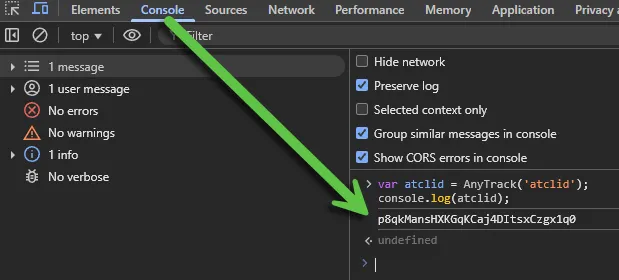
Step 2: Collect the atclid
Section titled “Step 2: Collect the atclid”You need to collect the atclid so you can include it in your conversion data later. You can use Google Tag Manager (GTM) scripting or other automation tools to store this value.
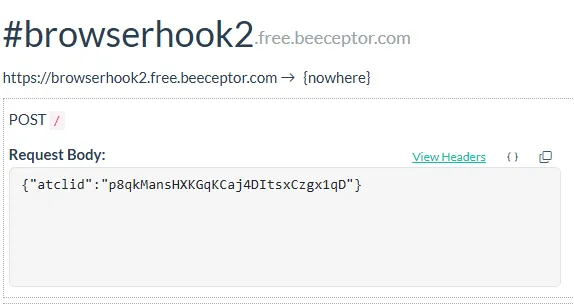
Here’s an example using JavaScript to send the atclid to an external platform via WebHook:
AnyTrack(function() { var atclid = AnyTrack('atclid'); fetch("https://browserhook2.free.beeceptor.com", { method: "POST", headers: { "Content-Type": "application/json" }, body: JSON.stringify({ atclid: atclid }) });});After running this code, your WebHook endpoint will receive the atclid value. You can use automation platforms like Zapier or Make to store this data and include it in your conversion tracking workflow.
Step 3: Send conversion events with atclid
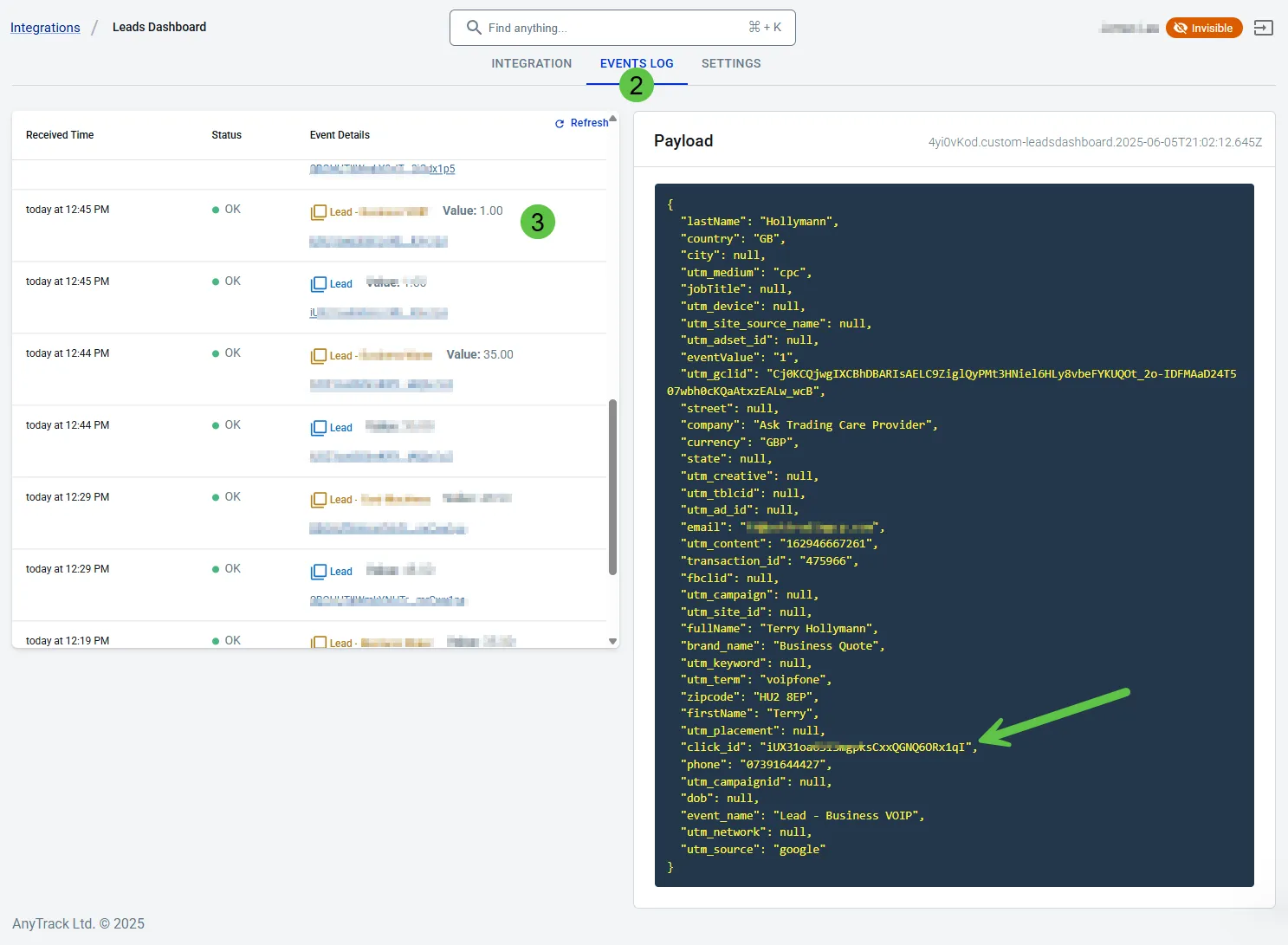
Section titled “Step 3: Send conversion events with atclid”- Create a Custom Integration endpoint in your AnyTrack account
- Send conversion events that include the collected
atclidvalue - Include additional event attributes to improve attribution modeling and ad optimization
For better conversion tracking results, include as many relevant event attributes as possible. This helps train ad platform algorithms and improves targeting effectiveness. Check our list of supported event attributes.
Troubleshooting: “No Matches Found” Error
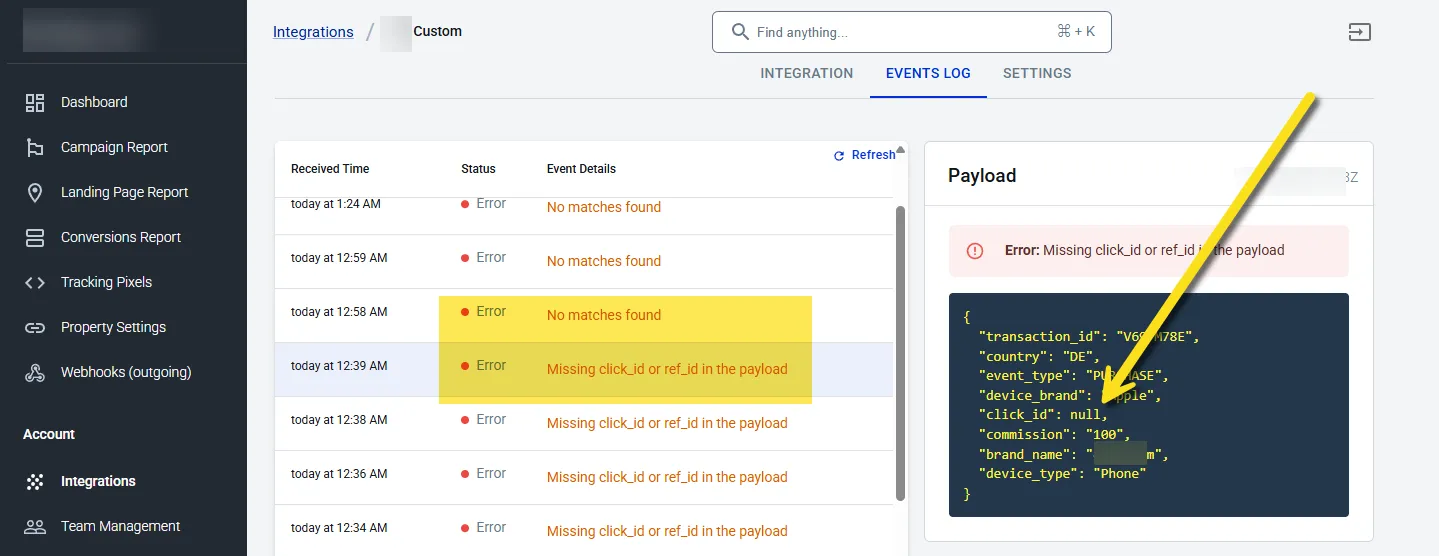
Section titled “Troubleshooting: “No Matches Found” Error”If you see “No match(es) found” or “Missing click_id” errors in your Events Log, it means the atclid value wasn’t included in your conversion data.
Why this error occurs:
Section titled “Why this error occurs:”- The conversion data sent to AnyTrack doesn’t include the required
atclid - Without the Click ID, AnyTrack cannot link the conversion to a specific website visitor
- The system cannot determine which ad generated the conversion
- The conversion event cannot be processed for attribution modeling
How to fix this error:
Section titled “How to fix this error:”- Verify your
atclidcollection code is working correctly - Ensure the
atclidis included in all conversion event data - Test your WebHook integration to confirm the Click ID is being transmitted
- Check that your automation platform (Zapier, Make, etc.) is passing the
atclidalong
Related Resources
Section titled “Related Resources”Frequently Asked Questions
FAQ was last reviewed on 2026-07-25