
Google Ads
Track, optimize, and measure Google Ads performance with AnyTrack easy-to-use conversion tracking and attribution platform. Maximize ROAS with server-side tracking and advanced campaign insights.
AnyTrack enables marketers to seamlessly integrate with Google Ads and use advanced data-driven features. Since Google Ads is the most complete advertising platform, understanding the integration scope maximizes each feature’s value.
Why Integrate Google Ads with AnyTrack?
Section titled “Why Integrate Google Ads with AnyTrack?”Connecting Google Ads to AnyTrack transforms how you track, attribute, and optimize your advertising campaigns. Here’s the business value you’ll unlock:
Immediate ROI Impact:
- Real-time decision making — See campaign performance instantly instead of waiting 24-48 hours for Google Ads reporting
- Higher conversion attribution . Server-side tracking recovers up to 30% more conversions than browser-based tracking
- Reduced wasted ad spend . Pause underperforming campaigns immediately when issues appear
Competitive Advantages:
- iOS 14+ compliance . Track iPhone users effectively despite Apple’s privacy restrictions
- Ad blocker immunity . Server-to-server conversion tracking bypasses browser limitations
- Cross-platform attribution . Connect Google Ads performance to your entire customer journey
Operational Efficiency:
- Unified dashboard . Manage multiple ad accounts and platforms from one interface
- Automated optimization . Enable Enhanced Conversions and Smart Bidding with complete data
- Time savings . Eliminate manual conversion tracking setup and maintenance
What You Can Do with Google Ads & AnyTrack Integration
Section titled “What You Can Do with Google Ads & AnyTrack Integration”Take control over your Google Ads data pipeline through AnyTrack’s direct API integration and standard Google Login.
Simple Setup and Data Control
Section titled “Simple Setup and Data Control”-
Google Tag Integration: AnyTrack automatically integrates with Google Tag (formerly Google Tag Manager) and acts as a tag manager itself.no coding or programming skills required.
-
Conversion Event Mapping . Control which events you send to Google Ads and customize delivery with the visual mapping interface
-
Conversion API . Send conversions from your integrations (eCommerce platforms, affiliate networks, CRM systems, APIs) directly to Google Ads servers
-
Dynamic UTM Tracking . Use the pre-built
UTMtracking template to automatically collect essential traffic metrics -
Enhanced Conversions . AnyTrack automatically formats, normalizes, and sends the customer data that Enhanced Conversions requires
Campaign Management
Section titled “Campaign Management”-
Campaign Management . Pause and resume campaigns directly from the AnyTrack dashboard
-
MCC Account Support . Connect your Manager (MCC) account to manage multiple Google Ads accounts from one place
-
Custom Audiences . Build audiences based on any events that AnyTrack collects
-
iOS 14 Tracking Support . AnyTrack provides native support for iOS 14 App Tracking Transparency
Reporting & Analytics
Section titled “Reporting & Analytics”-
Campaign KPIs . AnyTrack connects to your Google Ads account to fetch campaign metrics, enabling real-time performance visibility and campaign optimization before results appear in Google Ads or Google Analytics
-
Customer Journey Tracking . Drill down into your customer journey and identify touchpoints throughout your sales funnels
-
Real-time Attribution Reporting . AnyTrack reports update in real time so you always know campaign performance at any moment
-
Attributed Conversions . AnyTrack sends conversions in real-time, but Google Ads attributes them with a delay (up to 3 hours for last-click, up to 15 hours for other models). Compare attributed conversions with real-time conversions to make faster decisions
-
Post-View Attribution . The conversion data AnyTrack sends enables Google to attribute post-view conversions (when users see but don’t click ads before converting)
How to Create a Conversion Action in Google Ads
Section titled “How to Create a Conversion Action in Google Ads”Follow this step-by-step guide customized for affiliate marketers:
Tutorial Video - Google Ads Integration
Section titled “Tutorial Video - Google Ads Integration”In this tutorial we cover the following settings:
- Connecting your Google Ads account
- Mapping your Google Ads conversions with AnyTrack Standard Conversions
- Setting up the UTM Tracking Template in your Google Ads account
How to Set Up Google Ads Integration
Section titled “How to Set Up Google Ads Integration”Step 1: Configure AnyTrack Settings
Section titled “Step 1: Configure AnyTrack Settings”Navigate to the Tracking Pixels section in your AnyTrack dashboard and click Google Ads to load the conversion settings for your Google Ads account email.
Step 2: Select Your Google Ads Account
Section titled “Step 2: Select Your Google Ads Account”- Enter your
AW-12312312ID and click Next to grant AnyTrack access to your Google Ads account - Complete the standard Google login through the OAuth process (secure authentication system)
Step 3: Enable Data Connection
Section titled “Step 3: Enable Data Connection”When you connect your Google Ads account, you authorize AnyTrack to:
- Fetch your campaign performance data and metrics
- Analyze campaign data in the AnyTrack dashboard
- Send conversions directly to Google Ads servers
Step 4: Enable the Conversion API
Section titled “Step 4: Enable the Conversion API”Turn on server-side events to guarantee maximum conversion attribution. AnyTrack sends conversions directly from our servers to Google Ads servers, which means they don’t rely on cookies, can’t be blocked by ad blockers, and aren’t affected by browser privacy restrictions.
Step 5: Map Your Conversions to Google Ads
Section titled “Step 5: Map Your Conversions to Google Ads”After enabling data connection, map AnyTrack standard events to the conversion actions you created in your Google Ads account.
Google Ads UTM Tracking Template Setup
Section titled “Google Ads UTM Tracking Template Setup”A tracking template in Google Ads collects specific data about interactions with your ads through URL parameters (additional text added to your website links). These parameters can include UTM codes, which track data-driven audience segments and campaign performance.
Standard parameters automatically collect:
- The source of the click
- The type of device used
- Campaign information
Set up tracking templates in the “URL Options” at the account, campaign, or ad group level.
Get Your Tracking Template
Section titled “Get Your Tracking Template”- Save your conversion mapping settings
- Scroll up to open the Ads Integration tab
- Copy the
UTMtracking template that AnyTrack provides
Configure Google Ads Account Settings
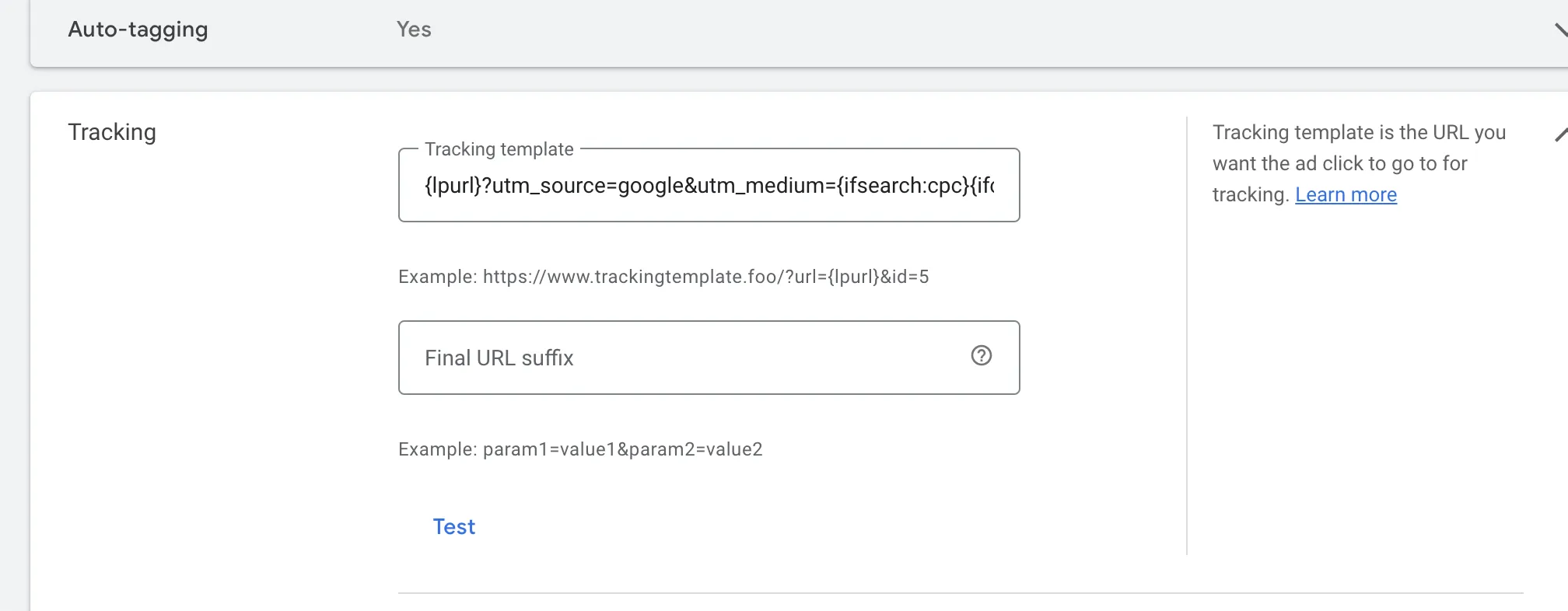
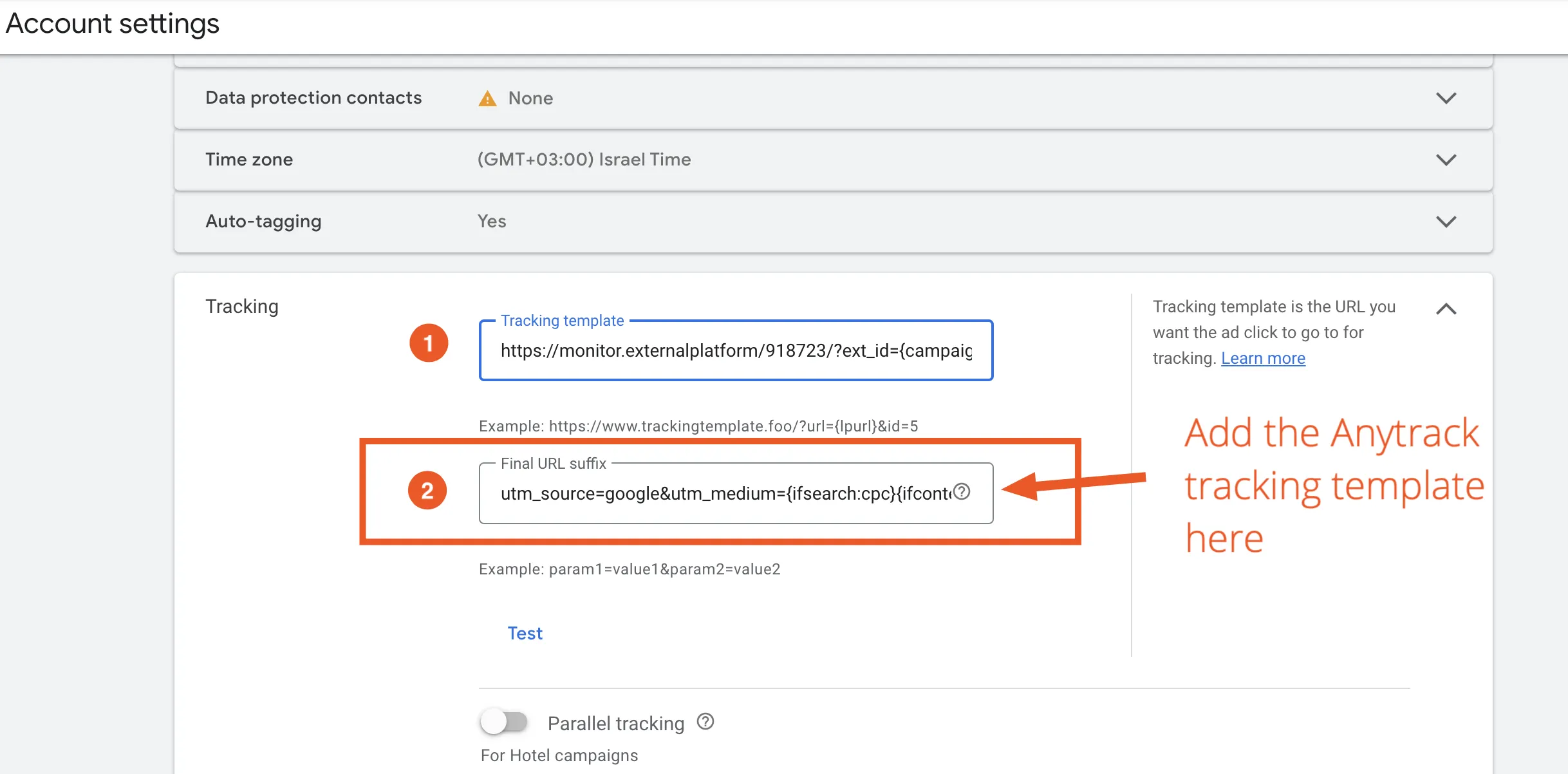
Section titled “Configure Google Ads Account Settings”- Navigate to your Account Settings (switch to the “All Campaigns” view first)
- Enable Auto-Tag if not already enabled
- Open the tracking settings
- Paste the tracking template in the tracking template field
Google Ads Integration - Frequently Asked Questions
FAQ was last reviewed on 2026-07-27