
Facebook UTM Parameters
Complete guide to Facebook UTM parameters and tracking templates. Learn how to install, verify, and manage UTM parameters for accurate campaign attribution.
Configure Facebook UTM parameters for accurate campaign tracking and attribution in AnyTrack. Learn AnyTrack’s recommended tracking template, installation process, and verification steps.
List of Facebook UTM parameters
Section titled “List of Facebook UTM parameters”| Parameter | Token | Example Value | Info |
|---|---|---|---|
utm_source | facebook | facebook | Name of the traffic source |
utm_medium | cpc | cpc | Cost Per Click |
utm_content | {{adset.name}} | SpringSale_AdSet1 | The name of the ad set in Facebook Ads. |
utm_campaign | {{campaign.name}} | Spring_Sale_2026 | The name of the campaign for attribution purposes. |
utm_term | {{ad.name}} | DiscountAd_VersionA | Refers to the specific ad used in the campaign. |
utm_id | {{campaign.id}} | 123456789 | A unique identifier for the campaign. |
ad_id | {{ad.id}} | 987654321 | A unique identifier for the specific ad. |
adset_id | {{adset.id}} | 111222333 | A unique identifier for the ad set. |
placement | {{placement}} | feed | Indicates where the ad appeared (e.g., feed, stories, right column, etc.). |
site_source_name | {{site_source_name}} | example.com | Identifies the name of the site source where the ad traffic originated. |
Unlike Google Ads, Facebook doesn’t provide a global setting for default UTM parameters.
The Facebook UTM Tracking Template
Section titled “The Facebook UTM Tracking Template”URL Tracking Template
Section titled “URL Tracking Template”A URL tracking template is a set of URL parameters and tokens appended to your ad URLs. Facebook automatically substitutes tokens with actual variables like campaign.id, adset.id, ad.id at runtime.
Example: The Facebook Campaign ID token {{campaign.id}} becomes the actual campaign ID 1283912839123812938 at runtime.
Using tokens instead of hard-coding values saves time, prevents errors, and enables better campaign analysis.
The Facebook UTM Parameter Tracking Template:
utm_source=facebook&utm_medium=cpc&utm_content={{adset.name}}&utm_campaign={{campaign.name}}&utm_term={{ad.name}}&utm_id={{campaign.id}}&ad_id={{ad.id}}&adset_id={{adset.id}}&placement={{placement}}&site_source_name={{site_source_name}}Example: The template carries adset_id={{adset.id}}. At runtime, {{adset.id}} becomes the actual ID 123123123123818:
https://anytrack.io?adset_id=123123123123818Where to Place the Tracking Template
Section titled “Where to Place the Tracking Template”The tracking template should be added in the URL Parameters field.
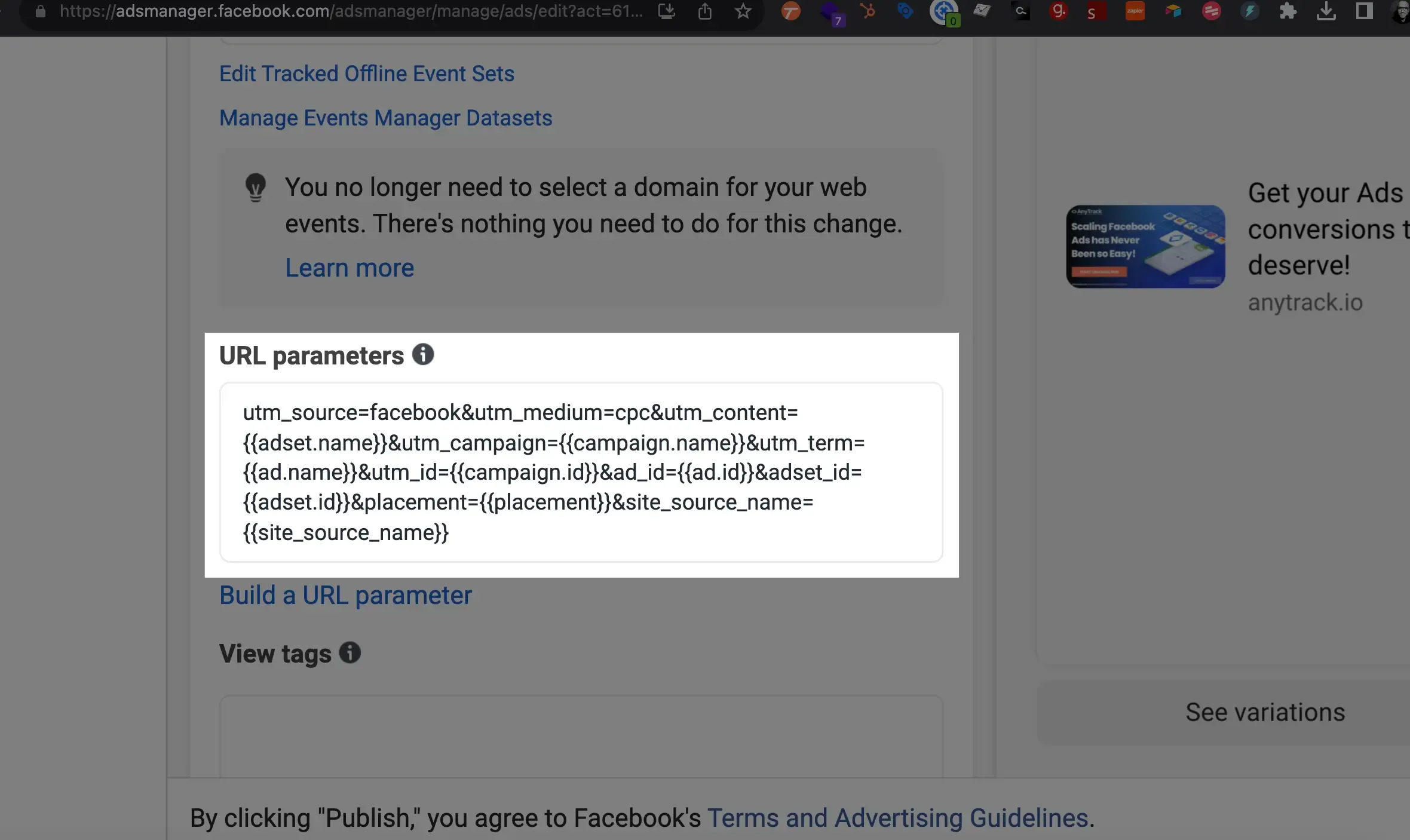
Why the URL Tracking Template Matters
Section titled “Why the URL Tracking Template Matters”The URL tracking template standardizes data collection across ads and campaigns. AnyTrack uses UTM parameters to build campaign reports and align Facebook Ads data with session data. Google Analytics uses UTM parameters for attribution reports.
Benefits:
- Improved tracking and attribution: Standardized parameters across campaigns
- Cross-platform reporting: Consistent data across AnyTrack, Google Analytics, and Facebook
- Custom audience building: Use campaign data for targeted audiences
- Cross-network use: Use parameters across multiple ad platforms
Finding the Facebook URL Tracking Template
Section titled “Finding the Facebook URL Tracking Template”Access AnyTrack’s prebuilt template in the Ads Integrations tab:
Tracking Pixels → your Meta Pixel → Ads Integrations
Customizing UTM Parameters
Section titled “Customizing UTM Parameters”Keep the ID-based parameters in the template, and customize or replace the name-based parameters as needed. AnyTrack uses UTM parameters to match ad account data with session data.
We recommend our tracking template because it follows Google Analytics best practices and enables accurate campaign, ad set, and ad reporting.
Compatibility with Other Tracking Software
Section titled “Compatibility with Other Tracking Software”The AnyTrack template is compatible with other tracking software. AnyTrack uses standard UTM parameters, while most alternatives use custom parameters like tw_id or h_adid. You can append custom parameters to the AnyTrack template without interference.
Required Parameters:
utm_sourceutm_mediumutm_campaignutm_idadset_idad_id
Verifying UTM Parameters in Your Ads
Section titled “Verifying UTM Parameters in Your Ads”- Go to Tracking Pixels → click on the Meta Pixel you want to verify
- Click the Ads Integrations tab
- Click VERIFY ADS SETTINGS
- AnyTrack highlights errors and suggests changes
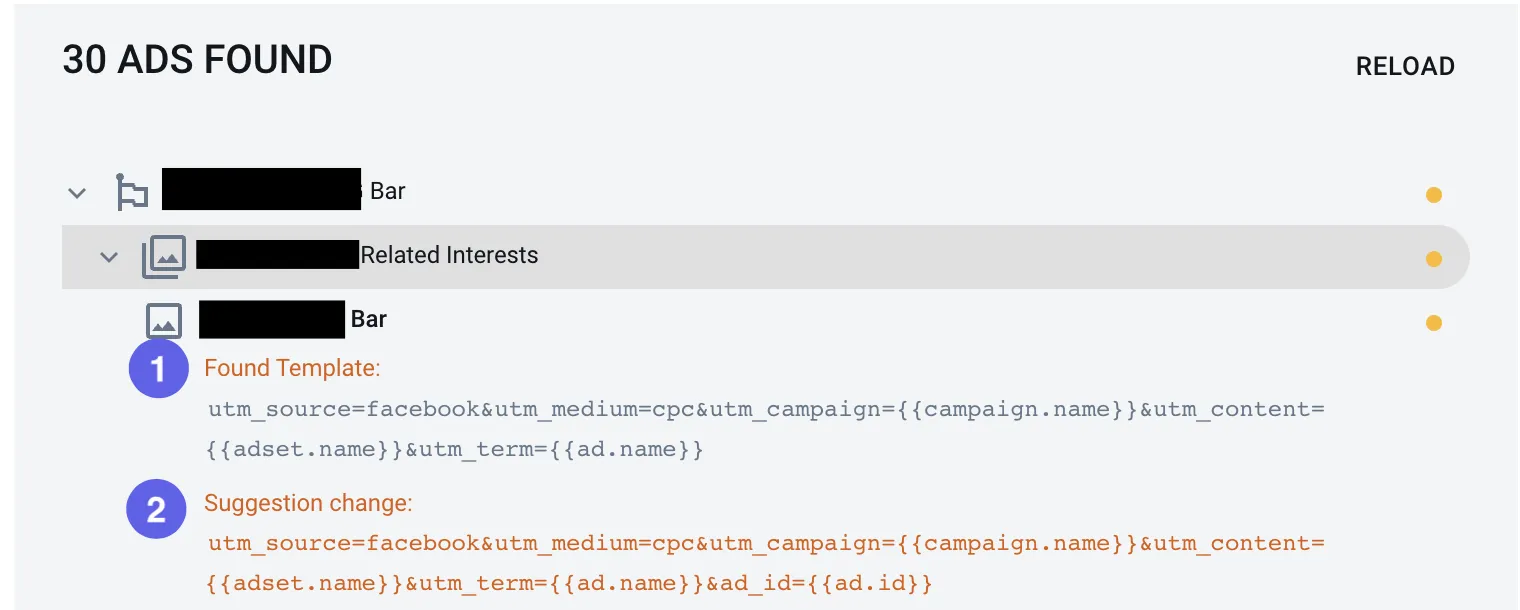
Bulk Update Facebook Ads with the URL Tracking Template
Section titled “Bulk Update Facebook Ads with the URL Tracking Template”Bulk update your Facebook Ads with AnyTrack’s URL Tracking Template for accurate tracking and reporting.
- Open AnyTrack and go to Tracking Pixels.
- Select your Meta Pixel and open Ads Integrations.
- Copy the UTM Tracking Template.
- Open Facebook Ads Manager and navigate to the Ads tab.
- Select the ads you want to update.
- Click Edit and select URL Parameters.
- Paste the template into the URL Parameters field.
- Save as draft or publish the updated ads.
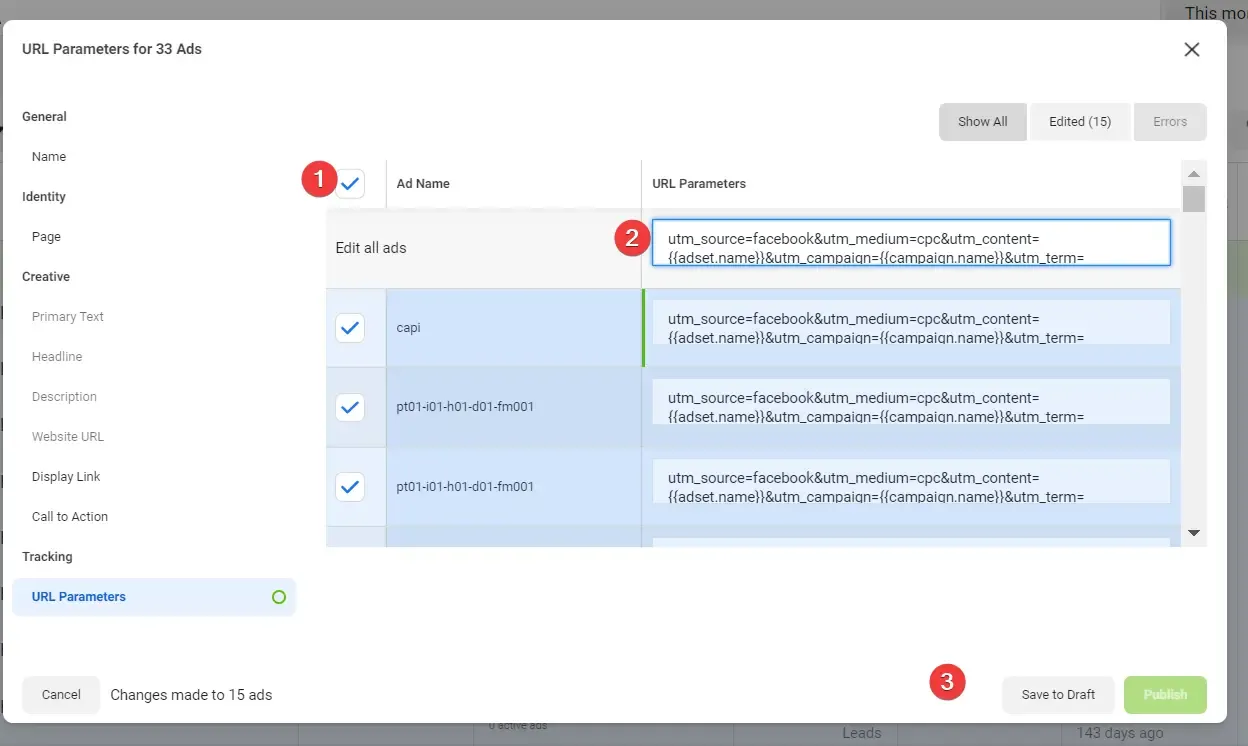
External References
Section titled “External References”Facebook UTM Parameters FAQ
FAQ was last reviewed on 2026-07-28
Why is the URL tracking template important?
Where can I find the Facebook URL Tracking Template?
Can I customize the UTM parameters in the tracking template?
How can I verify my ads' UTM parameters?
Can I use AnyTrack's UTM parameters with other tracking software?
tw_id or h_adid do not interfere with AnyTrack's parameters.What are the required UTM parameters for AnyTrack?
utm_source, utm_medium, utm_campaign, utm_id, adset_id, and ad_id. These ensure accurate tracking and reporting of campaigns, ad sets, and ads.Related Guides
Section titled “Related Guides”- Install the AnyTrack Tag: Get your Tracking Tag live on your site
- Facebook Ads Setup: Complete Facebook Ads integration setup
- Verify Ads Settings: Verify your UTM template installation
- Facebook Ads Troubleshooting: Fix common UTM and tracking issues
- Event Mapping: Map conversions to ad platform events
- Ad Platforms Attribution: How attribution and reporting delays work
- Advanced Options: Advanced tracking configuration