
BetMGM Partners
Learn how to connect BetMGM Partners affiliate management with AnyTrack for conversion tracking and reporting. Set up postback URLs and event mapping to track affiliate conversions and optimize your campaigns.
What is the BetMGM Partners Integration?
Section titled “What is the BetMGM Partners Integration?”The BetMGM Partners integration connects your affiliate marketing campaigns with AnyTrack’s conversion tracking system. This integration automatically collects visitor data, tracks affiliate link clicks, and records conversions from BetMGM Partners offers.
Why Use This Integration?
Section titled “Why Use This Integration?”Track Every Conversion Get complete visibility into your affiliate performance with real-time conversion data from BetMGM Partners to AnyTrack.
Optimize Ad Campaigns Feed accurate conversion data to Google Ads, Facebook Ads, and TikTok Ads for automatic campaign optimization.
Maximize ROI Make data-driven decisions with detailed attribution reports showing which traffic sources generate the most valuable conversions.
How the Integration Works
Section titled “How the Integration Works”The 4-Step Process
Section titled “The 4-Step Process”-
Visitor Arrives: AnyTrack collects traffic source data and visitor information when someone lands on your website.
-
Link Click Tracked: When visitors click your BetMGM Partners affiliate links, AnyTrack:
- Records detailed click data
- Sends events to your Tracking Tags
- Adds a unique identifier (
click_id) to the link
-
Conversion Recorded: When visitors convert on BetMGM Partners, the platform sends conversion data back to AnyTrack in real-time.
-
Data Distributed: AnyTrack processes the conversion and sends it to your ad platforms (Google Ads, Facebook Ads, TikTok Ads) for campaign optimization.
Integration Details
Section titled “Integration Details”| Setting | Value | Purpose |
|---|---|---|
| Tracking Group | incomeaccess | Activates automatic link tagging for BetMGM Partners links |
| Subid Parameter | tdpeh | Passes the unique click identifier to track conversions back to the original click |
| Method | API Integration | Real-time data connection between BetMGM Partners and AnyTrack |
Tracked Events
Section titled “Tracked Events”| Event | When It Triggers | Data Source |
|---|---|---|
| OutboundClick | Visitor clicks a BetMGM Partners offer link | AnyTrack tracking tag |
| Lead | Free registration completed on BetMGM Partners | Direct API from BetMGM Partners |
| Purchase | Commission generated from user activity | Direct API from BetMGM Partners |
Setup Instructions
Section titled “Setup Instructions”Step 1: Install the Integration
Section titled “Step 1: Install the Integration”- Go to your AnyTrack Integration Catalog
- Search for “BetMGM Partners”
- Click the BetMGM Partners card
- Click Install
Step 2: Submit Postback URLs to BetMGM Partners
Section titled “Step 2: Submit Postback URLs to BetMGM Partners”BetMGM Partners uses ROAR Digital as their affiliate platform provider.
- Copy the postback URLs shown above in your AnyTrack integration settings
- Contact your BetMGM Partners affiliate manager via email
- Include this information in your message:
- Subject: “AnyTrack Postback URL Setup Request”
- Postback URLs (copied from AnyTrack)
- Your affiliate ID
- Request confirmation when URLs are activated
Don’t have an affiliate manager contact?
- Log into your BetMGM Partners dashboard
- Navigate to Support or Contact section
- Submit a support ticket with the postback URLs
Typical activation time: 2-3 business days
Validate Your Setup
Section titled “Validate Your Setup”Check Link Tracking
Section titled “Check Link Tracking”Your affiliate links need proper tracking data tags. AnyTrack handles this automatically through AutoTag.
AutoTag Methods:
- Automatic (Recommended): AnyTrack finds and tags BetMGM Partners links automatically
- AutoScan: Works with redirect plugins by scanning and tagging embedded links
- Manual: Add tracking attributes using
data-tracking-group="incomeaccess"or append&tdpeh=--CLICK-ID--to links
Manual Link Example:
<a href="https://example.foo/goto/betmgmpartners" data-tracking-group="incomeaccess"> BetMGM Partners Offer</a>Verify Link Tagging:
- Add a BetMGM Partners affiliate link to your website
- Hover over the link or inspect it in browser developer tools
- Confirm the
tdpeh=[click_id]parameter is added automatically
Verify Conversions
Section titled “Verify Conversions”Check your conversion tracking by either:
- Waiting for a natural conversion
- Creating a test conversion yourself
Then inspect the conversion logs in your AnyTrack dashboard to confirm data flows correctly.
Sample Conversion Data:
{ "netrevenue": "2.55", "affcustomid": "QfdSVGM3YZTZjwj0DElkDFYFBbgendJlTZ", "activedays": "1", "totalcommission": "1.02", "bannerid": "1195", "creativename": "Text_Link_WH_Sport", "clicks": "0"}What to Expect After Setup
Section titled “What to Expect After Setup”Timeline
Section titled “Timeline”Real-Time Tracking:
- Immediate: Link clicks appear as OutboundClick events in AnyTrack (visible within seconds)
- Real-time conversions: Conversion data flows from the affiliate program to AnyTrack and then to your connected ad platforms in real-time
- Validation timeframe: Depending on your traffic volume, you can validate the integration within minutes to hours (not days)
Where to Check
Section titled “Where to Check”- Link tracking: Use the AnyTrack Pixel Helper extension on your website
- Conversions: Check the Integration Event Log in your AnyTrack dashboard
- Attribution: View Attribution Reports in your dashboard
- Real-time validation: Connect Google Analytics 4 and use Debug View to see events in real-time
If You Don’t See Data
Section titled “If You Don’t See Data”If conversions don’t appear within a few hours of active traffic:
- Review the Integration Event Log for errors
- Verify the
tdpehparameter appears in your BetMGM Partners dashboard reports - Follow troubleshooting steps below
Common Questions
Section titled “Common Questions”Common Questions
FAQ was last reviewed on 2026-07-28
Can I import past conversions?
click_id to connect them to traffic sources.Can I track direct linking campaigns?
Can I use a different <code>subid</code> parameter?
c parameter that AnyTrack provides. Using a different parameter will prevent conversions from being tracked back to the original click.What if conversions don't have a <code>click_id</code>?
click_id cannot be tracked. The click_id connects the conversion back to the original website visit and traffic source. Without it, AnyTrack cannot attribute the conversion correctly. Learn more about click IDsTroubleshooting
Section titled “Troubleshooting”Step 1: Verify Your Basic Setup
Section titled “Step 1: Verify Your Basic Setup”Check Tracking Tag Installation
- Install the AnyTrack Pixel Helper Chrome Extension
- Visit your website
- Verify the extension icon turns blue (indicating AnyTrack Tag is detected)
- If the icon doesn’t turn blue, review tag installation
Verify Postback URL is Valid
- Go to your AnyTrack integration settings for BetMGM Partners
- Check for error messages in the integration status
- If you see “Api key format is invalid” or similar errors:
- Log into your BetMGM Partners affiliate dashboard
- Contact your affiliate manager to update the postback URLs
- Update the postback URL in AnyTrack settings
- Click Save
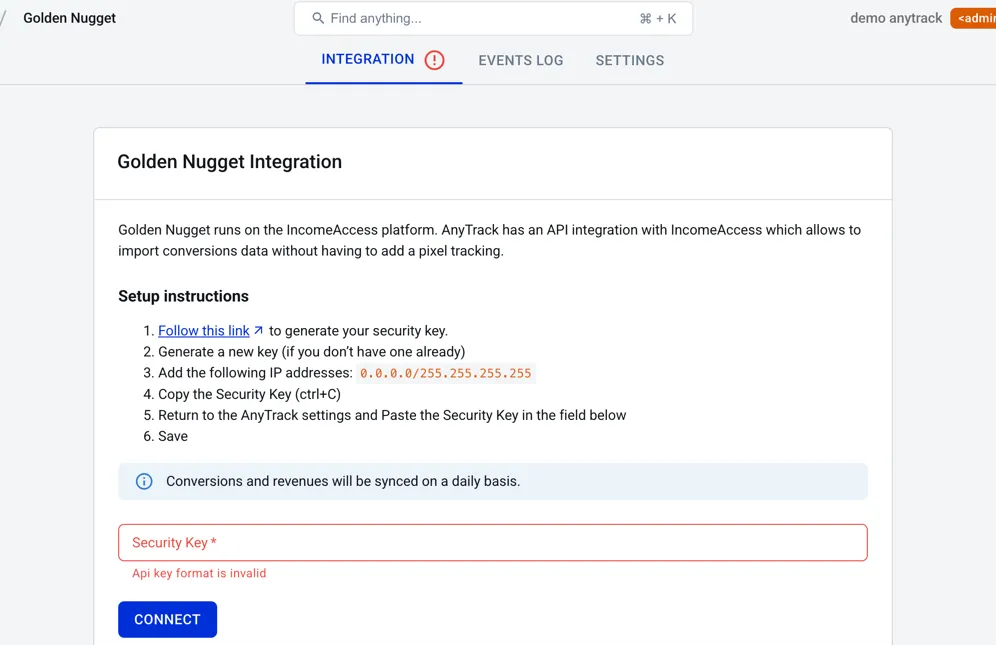
Step 2: Not Getting Any Conversions?
Section titled “Step 2: Not Getting Any Conversions?”Check Your Integration Settings
- Verify the integration is active in your BetMGM Partners affiliate dashboard
- Confirm you’re using the correct AutoTag parameter (
tdpeh) - Check that your postback URL hasn’t expired (if applicable)
Check Your Link Tagging
- Verify links aren’t hidden behind JavaScript or double redirects
- Ensure links use standard
<a>HTML elements - Try adding the tracking group manually:
data-tracking-group="incomeaccess"
Step 3: Conversions Show Errors?
Section titled “Step 3: Conversions Show Errors?”Most Common Issue: Missing Click ID
This happens when AutoTag couldn’t add the click_id to your affiliate links.
Solutions:
- Check if links are behind JavaScript or complex redirects
- Verify links are in standard HTML format
- Manually add tracking group attributes to links
- Ensure your offers only get traffic from pages with the AnyTrack Tag installed
Conversions Not Validated?
- Compare your integration settings with AnyTrack’s pre-defined integration
- Copy the Event Reference from your Integration Event Log and contact support
Related Resources
Section titled “Related Resources”Essential Setup Guides
Section titled “Essential Setup Guides”- Install AnyTrack Tag - Set up tracking on your website
- AutoTag Explained - Understand automatic link tagging
- Tracking Groups (TGID) - Learn about tracking group identifiers
- Click ID Overview - Understand unique click identifiers
IncomeAccess Platform
Section titled “IncomeAccess Platform”- IncomeAccess Integration Overview - Platform explanation and all available programs
- Request New Integration - Suggest a program
Monitoring & Troubleshooting
Section titled “Monitoring & Troubleshooting”- Integration Event Log - Monitor conversion data
- AnyTrack Pixel Helper - Verify tracking installation
- Integration Troubleshooting - Common issues
- Contact Support - Get help from our team
Advanced Setups
Section titled “Advanced Setups”- Direct Linking Setup - Track direct-to-offer campaigns
- Cross-Domain Tracking - Track across multiple domains