
Manage Your Subscription
Manage your AnyTrack subscription directly from your dashboard. Upgrade, downgrade, or cancel anytime. Learn about free trials, billing notifications, and account management.
Manage your AnyTrack subscription directly from your dashboard’s billing section. Upgrade, downgrade, cancel, and monitor usage at any time.
Billing section
Section titled “Billing section”The billing section shows your current billing cycle, usage, and upcoming charges.
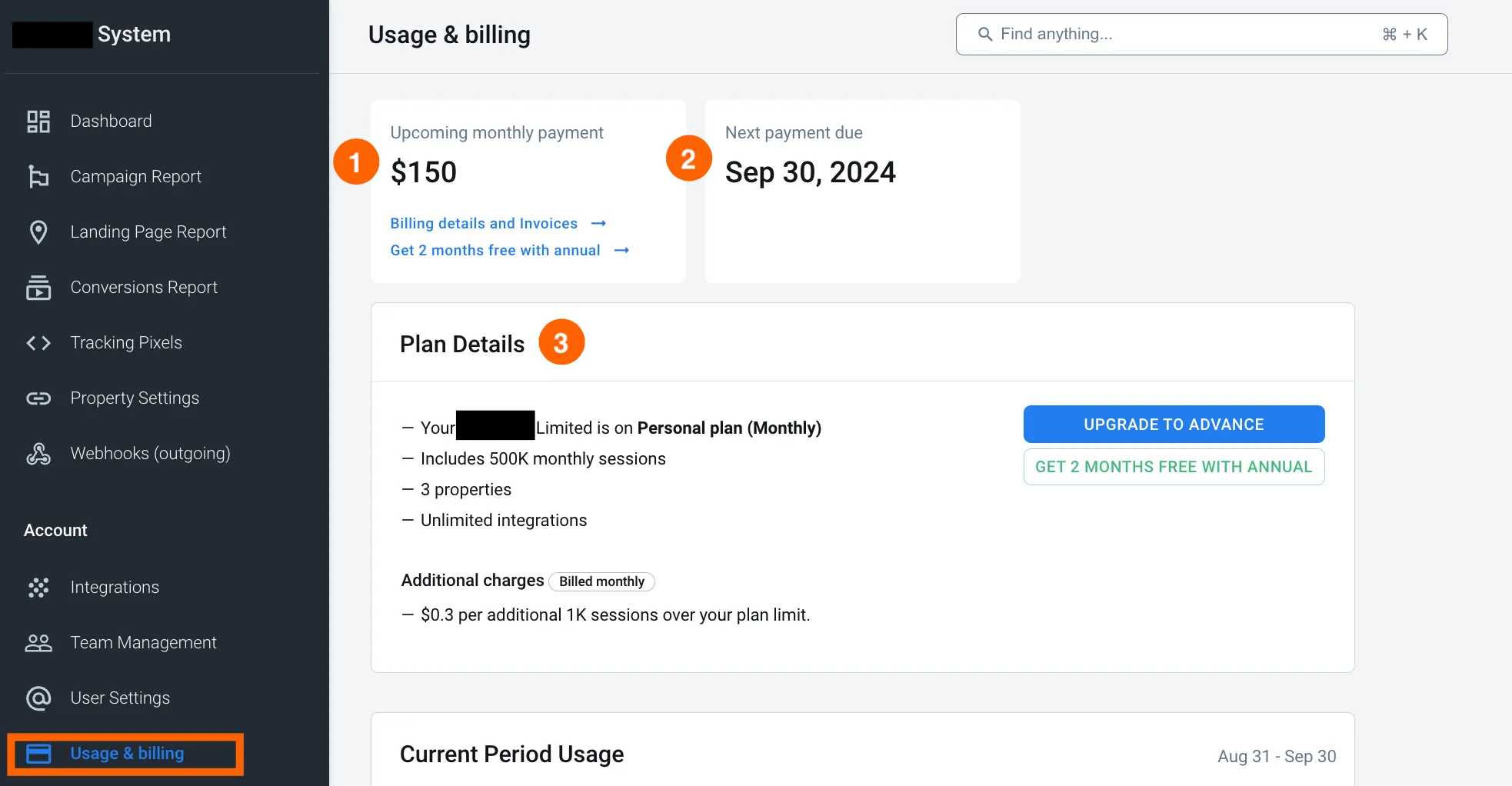
Current period usage
Section titled “Current period usage”Current period usage shows your account usage, including billable sessions, properties, and integrations.
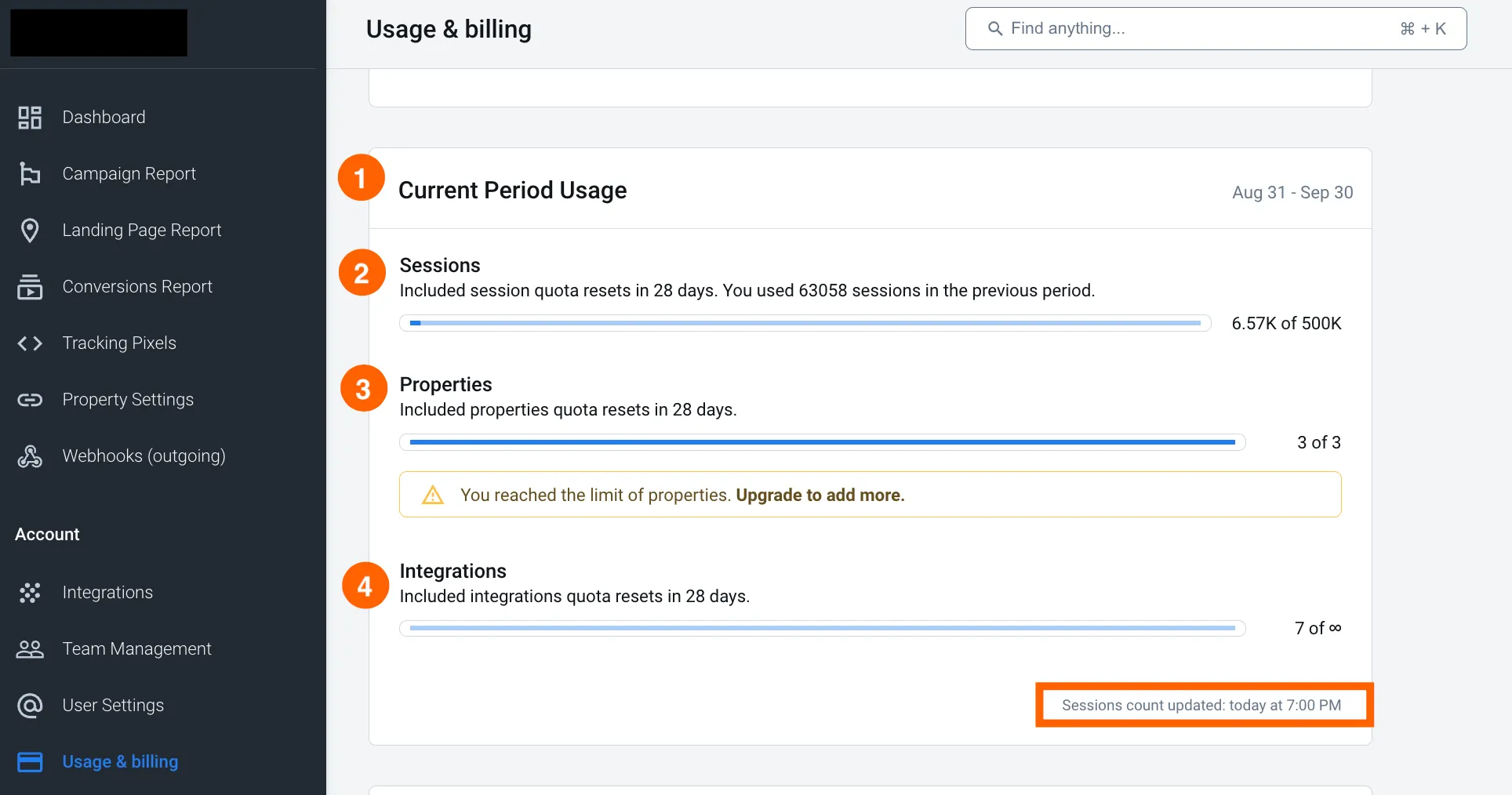
Manage your AnyTrack Subscription and billing
Section titled “Manage your AnyTrack Subscription and billing”- Upgrade: Select the new plan from your dashboard. Your payment is prorated to reflect the new plan. All details appear on your invoice for full transparency.
- Downgrade: Downgrading may require account changes. For example, moving from the Advance Plan (10 properties) to the Personal Plan requires deleting 7 properties. Your downgrade takes effect at the start of your next billing cycle with no additional charges. Learn about credit notes for unused plan time.
- Cancel: Cancel your AnyTrack subscription at any time. Your service continues through the end of your current billing period, preventing further charges. If you’re in a free trial, cancellation immediately suspends your account.
Invoices and payment methods
Section titled “Invoices and payment methods”- Invoices and billing details: Access your invoices and update your payment method and billing details if needed.
- Billing notifications: You receive notifications for every significant subscription event—free trial ends, upgrades, downgrades, payments, and renewals. Stripe sends these notifications via email and logs them on our servers.
Unsubscribe from all email notifications except billing emails. Add the anytrack.io domain to your mail server whitelist to receive all important updates.
Troubleshooting
Section titled “Troubleshooting”- Failed payments: If your payment fails, the system automatically retries. You receive notifications via email and through your AnyTrack dashboard. Update your payment details immediately to prevent service interruptions.
- Account suspensions: Accounts suspend due to failed payments or policy violations. Contact support and resolve any outstanding issues by updating your payment information.
- Credit notes: When you downgrade to a lower plan, the unused time from your previous plan automatically generates a credit note. This credit applies to future bills on your new plan.
FAQ for AnyTrack Subscription
FAQ was last reviewed on 2026-07-26
How does the free trial work?
Your free trial starts immediately after you select a plan and click Start Free Trial. You get 14 days of full access to all features with no charges.
Does each plan have a free trial?
Yes, every plan includes a 14-day free trial. Experience the full range of features and limits for your chosen plan. The free trial applies once per account.
What happens if I cancel my free trial?
Cancellation stops all tracking and services immediately. You remain in control of your service at all times.
Can I reactivate my free trial after cancelling?
Yes, as long as you are still within the original 14-day trial period. Reactivate your trial within the trial period and pick up where you left off with remaining days still available. Once the trial period has ended, it can't be restarted.
Can I get a new free trial if I cancelled my subscription and want to come back?
No. The free trial is available once per account. If you previously subscribed and later cancelled, re-subscribing starts your paid plan immediately — billing begins as soon as you confirm your plan, with no new trial. To re-subscribe, go to Usage & Billing and choose a plan. Your historical conversion data is retained for 12 months after cancellation, so reactivating within that window restores access to it.
Can I upgrade or downgrade my plan at any time?
Yes. Upgrades take effect immediately. Downgrades take effect at the end of your current billing cycle.
What if I need more properties than my plan allows?
Upgrade to the next plan or add extra properties on the Advance plan for $30 per month. AnyTrack scales with your business.
How are extra properties billed?
Extra properties on the Advance plan bill at $30 per month. Charges are prorated and applied immediately.
Do you offer custom plans?
Yes. Contact us for a custom plan tailored to your business if the Advance plan doesn't meet your needs.
What happens if I cancel my AnyTrack subscription?
Your subscription remains active through the end of your current billing cycle. Learn more about cancellation.
How is billing handled, and is my payment information secure?
Stripe securely manages billing. AnyTrack does not store your payment details. Add the
anytrack.io domain to your mail whitelist for billing notifications.What happens if my payment fails?
We automatically retry the payment. Update your payment information immediately to restore service.
I paid my outstanding invoice but my account is still suspended — what do I do?
Accounts suspend due to failed payments or policy violations, and resolving the payment issue restores service. If you have already paid — for example, you have a Stripe receipt — and your account still shows as suspended, do not keep retrying payments or billing actions. Contact support by email at support@anytrack.io or through the chat icon in your dashboard so the team can verify that your payment was applied to your account and restore your service.
Are refunds available?
All payments are final. Learn more about our refund policy.
What does unlimited mean?
Unlimited features have no caps. On the Personal plan, you connect unlimited conversion sources.
Is the Free Plan really free?
Yes. The Free Plan is 100% free with no credit card required.
What is Ad Platform support?
Ad Platform support enables integration with ad platforms for precise tracking and campaign attribution.
How do I monitor my usage and avoid overage fees?
Monitor usage in your dashboard to track plan limits. Overage fees bill monthly for the previous month. Learn more about session overage fees and how automatic overage billing works.