
TikTok Ads
Connect TikTok Ads to AnyTrack and send conversions through the TikTok Conversion API. Get accurate attribution and real-time optimization signals across affiliate, eCommerce, and lead generation campaigns.
The TikTok Ads integration lets AnyTrack send conversions to the TikTok Conversion API so you can optimize campaigns, build audiences, and report on attributed revenue. AnyTrack handles event mapping, deduplication, and PII hashing automatically.
❗ Important
Remove any existing TikTok pixel installed via Shopify, Google Tag Manager, or theme code before completing the setup. AnyTrack loads the TikTok Tracking Tag with deduplication parameters automatically — duplicate installations break dedup and can double-count conversions.
Step 1: Connect AnyTrack with TikTok
Section titled “Step 1: Connect AnyTrack with TikTok”From the AnyTrack Dashboard:
- Open Tracking Tags — Click Tracking Tags, then TikTok.
- Authorize — Click Browse to open the TikTok authentication window, then click Authorize the AnyTrack App.
- Confirm redirect — You return to the AnyTrack Dashboard with the TikTok connection live.
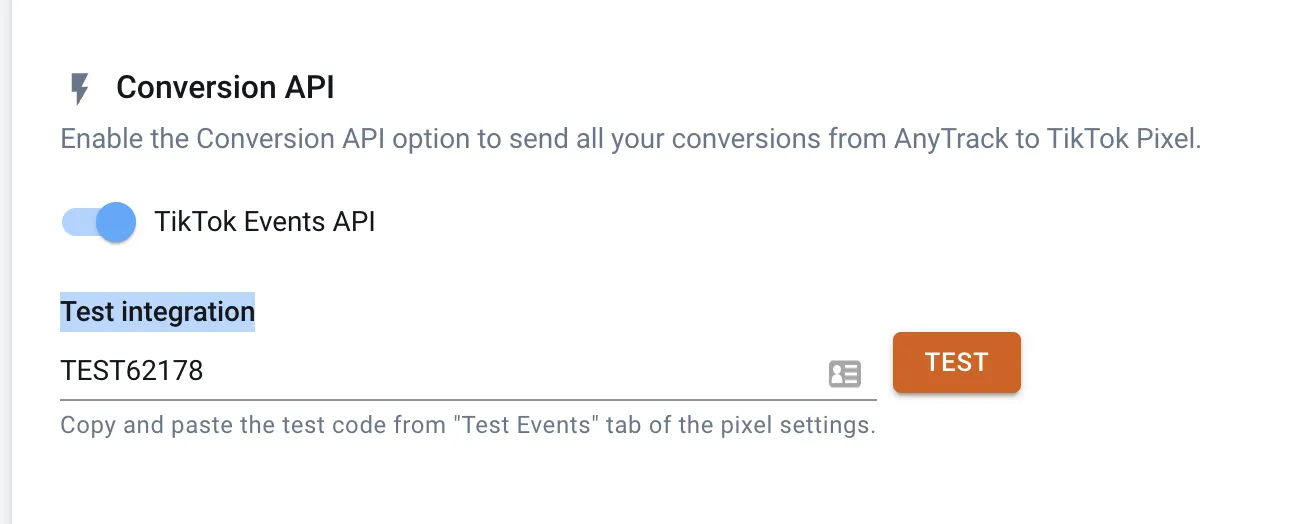
- Enable the TikTok Conversion API — Toggle it on in the TikTok pixel settings.
- Save your settings.
Step 2: Configure Event Mapping
Section titled “Step 2: Configure Event Mapping”Conversions tracked by AnyTrack are mapped to TikTok standard events. Default mappings cover the standard funnel events — review them and adjust if your funnel needs custom mapping.
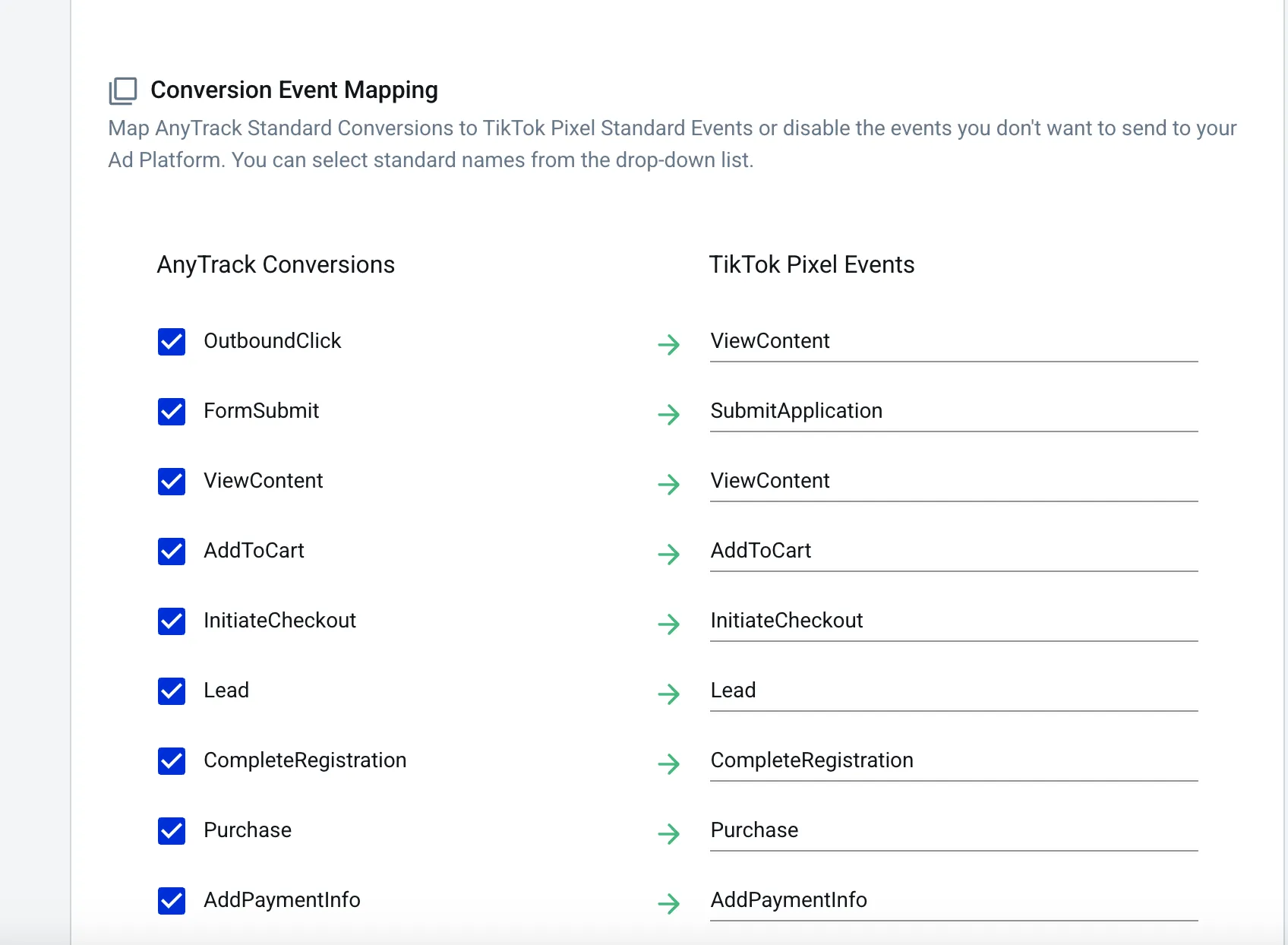
Step 3: Update Your TikTok Pixel Settings
Section titled “Step 3: Update Your TikTok Pixel Settings”In TikTok Ads Manager:
- Allow first-party cookies on the pixel.
- Enable Automatic Advanced Matching.
Both settings improve Event Match Quality when AnyTrack sends conversions.
Step 4: Verify Your Setup
Section titled “Step 4: Verify Your Setup”You can send test events to the TikTok Conversion API and confirm they arrive on TikTok’s side:
- In TikTok, open the Test Event tab and copy the Test Event ID. Keep the tab open.
- In AnyTrack, open the TikTok pixel settings and paste the Test Event ID into the test field.
- Click TEST.
Test events appear in TikTok’s Test Event tab within a few seconds.
Step 5: Add the TikTok UTM Template to Your Ads
Section titled “Step 5: Add the TikTok UTM Template to Your Ads”Unlike Facebook Ads or Google Ads, TikTok does not auto-append UTM parameters. Add the UTM tracking template manually so AnyTrack can attribute traffic to the right campaigns.
Copy the template from Tracking Tags → TikTok Tracking Tag → Ads Integration tab. In TikTok Ads Manager, go to Ad → Ad details and paste the URL with the appended UTM template.
Example template:
https://www.example.com/?utm_source=tiktok&utm_medium=cpc&utm_campaign=__CAMPAIGN_NAME__&utm_id=__CAMPAIGN_ID__&utm_term=__CID_NAME__&utm_content=__AID_NAME__&ad_id=__CID__&ad_placement=__PLACEMENT__&adset_id=__AID__&ad_site=__CSITE__&ad_type=__CTYPE__Save your changes in TikTok, then return to the Ads Integration tab in AnyTrack and click Verify Ads Settings (or Reload if you ran verification earlier). Ads with the correct template show a green indicator and attribute correctly.
How the TikTok Conversion API Works
Section titled “How the TikTok Conversion API Works”TikTok’s Conversion API (also called the Events API) accepts conversion events directly from your server, complementing the browser-loaded TikTok Pixel. Server-side delivery bypasses ad blockers, ITP cookie expiry, and abandoned page loads. The conversion reaches TikTok even when the browser cannot fire the pixel.
AnyTrack runs the full Conversion API pipeline so you do not need to manage authentication, retries, or field mapping:
- Authentication — AnyTrack generates and rotates the TikTok Access Token when you authorize your TikTok account.
- Event mapping — AnyTrack maps every AnyTrack event to the matching TikTok standard event and forwards it via the Conversion API endpoint.
- PII hashing — Customer email and phone are hashed with SHA-256 before they reach TikTok. AnyTrack handles lowercase normalization and trimming automatically.
- Click ID forwarding — The
ttclid(TikTok Click ID) captured at landing is attached to every conversion so TikTok attributes it to the original ad click. - Deduplication — AnyTrack tags every conversion with a shared
event_idso TikTok deduplicates the browser pixel event and the server-side event when both fire.
For the full server-side architecture and how it applies across every ad platform, see Server-Side Tracking.
Server-Side vs Browser-Side Tracking on TikTok
Section titled “Server-Side vs Browser-Side Tracking on TikTok”TikTok provides two complementary tracking layers:
| TikTok Pixel (Browser) | TikTok Conversion API (Server) | |
|---|---|---|
| Where it runs | Visitor browser | AnyTrack server |
| Blocked by ad blockers | Yes | No |
| Blocked by ITP / cookie expiry | Yes | No |
Captures ttclid | Yes (from URL) | Yes (forwarded by AnyTrack) |
| Hashes PII | No | Yes (SHA-256) |
| Real-time delivery | Yes | Yes |
The recommended setup is hybrid: both layers active simultaneously, with a shared event_id so TikTok deduplicates the matched pair. AnyTrack ships hybrid by default. Connect your TikTok account and AnyTrack loads the pixel and starts server-side delivery on the same day.
If you previously installed the TikTok Pixel manually or through Shopify’s TikTok app, remove that installation. The pixel AnyTrack loads carries the deduplication parameters; a second manually-installed pixel inflates event counts in TikTok Events Manager.
TikTok Integration Features
Section titled “TikTok Integration Features”- No-code authentication — Connect through standard TikTok OAuth in one click.
- Conversion API and Tracking Tag — AnyTrack sends conversions through both channels with automatic deduplication.
- PII hashing — Customer emails and phone numbers are hashed with SHA-256 before reaching TikTok.
- eCommerce conversion data — Itemized orders with product IDs, names, prices, quantities, and brand names.
- Affiliate conversion data — Standard affiliate conversion mapping out of the box.
- Lead generation events — Track
FormSubmit,Lead, andCompleteRegistrationconversions. - UTM tracking template — Pre-built template with dynamic campaign placeholders.
- Campaign reports — Attributed conversions, revenue, and ROAS in the AnyTrack Campaign Report.
- Custom audience signals — Conversion data feeds TikTok audience building automatically.
- Budget management — Adjust TikTok campaign budgets from the AnyTrack Dashboard.
Related Resources
Section titled “Related Resources”- TikTok UTM tracking template
- Install AnyTrack Tag
- Shopify and TikTok Ads
- Server-Side Tracking
- Event deduplication
- AnyTrack attribution explained
FAQ and Troubleshooting
FAQ was last reviewed on 2026-06-22